Image Summarizer
Περισσότερα εργαλεία σε αυτήν την κατηγορία χωρίς να φύγετε από αυτήν τη σελίδα.
Image Summarizer
Δωρεάν Image Summarizer
Upload an image and get a plain-language summary of the visible content. Use it for screenshots, notes, charts, diagrams, scanned pages, and visual references you want to understand faster.
Images
Upload common image files
TXT
Copy or download summary
Δωρεάν
No account needed
What the Image Summarizer does
The image summarizer analyzes the uploaded picture and turns visible information into readable text. It is useful when you have a screenshot, chart, slide image, or note photo and need the main point quickly.
- Accepted input: PNG, JPG, JPEG, GIF, WebP, SVG, BMP, and TIFF files up to 25 MB.
- Έξοδος: A readable visual summary with copy controls and TXT download.
- Ιδανικό για: Students, researchers, creators, and teams turning image-based information into notes.
- Limit: Visual summaries can miss tiny text, unclear handwriting, cropped sections, low-contrast details, or data points hidden in dense charts.
How it works
Upload the file, let Sceneform extract the usable content, then review the generated summary before you use it in notes, research, or publishing.
01
Upload the image
Choose a supported image file. Clear, well-lit images produce better summaries than blurry or cropped screenshots.
02
Generate the summary
Sceneform reads visible text and visual context, then produces a written summary.
03
Αντιγραφή ή λήψη
Review the summary, copy it to your notes, or download the result as a TXT file.
Image summaries are strongest when the visual has a clear job
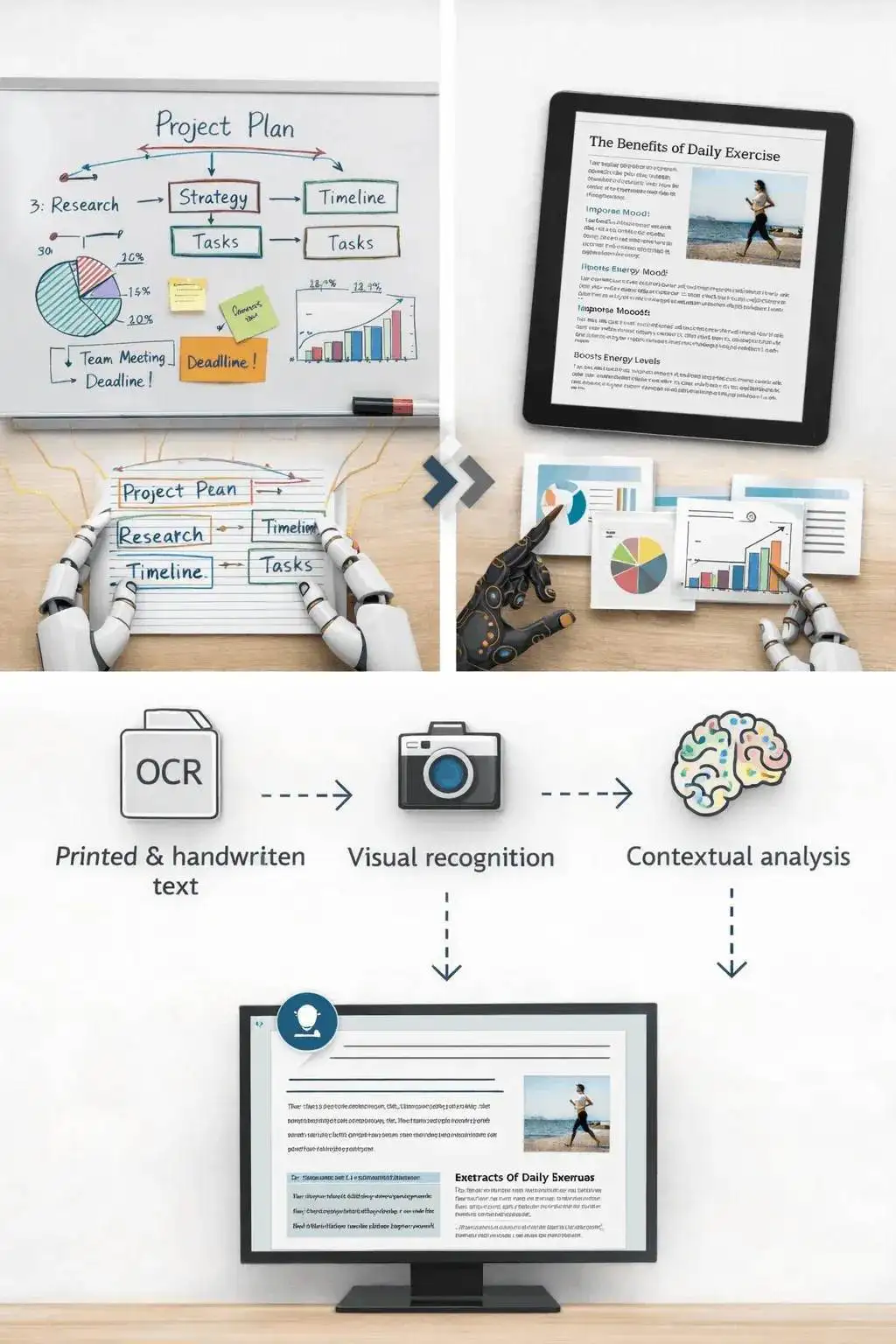
A screenshot of an article, a chart from a report, or a photo of notes usually has a clear structure. The tool can summarize the visible text and explain the main visual context.
It is less reliable on decorative images, screenshots with many tiny panels, or photos where the important content is partly cut off.
- Screenshots: Summarize articles, app screens, social posts, and research snippets.
- Notes: Turn readable handwritten or printed notes into a cleaner written recap.
- Charts: Extract the visible trend or comparison, then verify important numbers manually.
Know when to use another tool
If the image is actually a slide deck export, the PPT summarizer may preserve the presentation structure better. If the file is a PDF document, use a document or paper summarizer instead.
Use the image summarizer when the source is truly visual: a photo, chart, screenshot, scanned note, whiteboard, or diagram.

What affects summary quality
Summaries are a first pass, not a substitute for reviewing important source material. The output improves when the file is readable, complete, and focused.
Good input
A clear screenshot, scanned page, diagram, chart, whiteboard photo, or note image with readable text and enough resolution.
Image clarity matters more than file type. A sharp PNG usually beats a blurry photo.
Charts need readable labels. If a chart is unlabeled or the text is tiny, verify the interpretation manually.
Use this for understanding and notes, not as a final source of truth for contracts, diagnoses, invoices, or compliance work.
Useful ways to use the summary
The best summary gives you a faster route into the material. Use it to decide what deserves closer attention, prepare notes, or turn a long file into a readable starting point.
Summarize screenshots
Turn saved posts, article screenshots, app screens, and research clips into readable notes.
Review visual reports
Get a plain-language first pass on charts, dashboards, and infographics before digging in.
Capture notes
Summarize classroom notes, meeting whiteboards, and photographed pages without retyping everything.
Choose the right summarizer
Use the tool that matches your source file. That keeps the output focused and prevents audio, slide, document, and image workflows from blending together.
| Content | Recommended tool | Χρησιμοποιήστε το για |
|---|---|---|
| Screenshots, photos, charts, notes, and image files | Image Summarizer | Visual summaries, OCR-style extraction, and screenshot notes |
| Video files | Περιληπτικό Βίντεο | Summaries from uploaded videos with spoken audio |
| Slides and presentation exports | PPT Summarizer | Deck summaries and slide-level notes |
| Word documents and reports | Περιληπτικό Εγγράφου Word | Text-heavy document summaries |
Free, no account, and temporary processing
Τα δωρεάν εργαλεία του Sceneform δεν απαιτούν λογαριασμό. Η κανονική χρήση είναι απεριόριστη, με ελέγχους κατάχρησης που διατηρούνται για αυτοματοποιημένη ή υπερβολική κίνηση.
Uploaded files are used to create your result and deleted after processing. Avoid uploading files you are not allowed to process, and review summaries before using them for academic, business, medical, legal, or financial decisions.
More Free Tools
Explore other tools to help you download and convert media
YouTube to MP3
Μετατρέψτε βίντεο YouTube σε ήχο MP3 από το πρόγραμμα περιήγησής σας. Δωρεάν χρήση, δεν απαιτείται λογαριασμός.
YouTube to MP3YouTube to MP4
Αποθηκεύστε βίντεο YouTube ως αρχεία MP4 για επεξεργασία, έρευνα ή αναθεώρηση χωρίς σύνδεση.
YouTube to MP4YouTube Video Downloader
Κατεβάστε βίντεο YouTube μέσω μιας απλής ροής εργασίας προγράμματος περιήγησης για έρευνα δημιουργών.
YouTube Video DownloaderYouTube Shorts Downloader
Αποθηκεύστε δημόσια YouTube Shorts ως αρχεία MP4 για αναφορά, αναθεώρηση ή ροές εργασίας επεξεργασίας.
YouTube Shorts DownloaderYouTube Thumbnail Downloader
Κατεβάστε διαθέσιμες μικρογραφίες από δημόσια βίντεο YouTube και Shorts.
YouTube Thumbnail DownloaderYouTube Username Generator
Δημιουργήστε ιδέες ονόματος καναλιού YouTube από τη δική σας κατηγορία, κοινό και θέση.
YouTube Username GeneratorYouTube Hashtag Generator
Μετατρέψτε ένα θέμα βίντεο σε σχετικές ετικέτες YouTube και ιδέες συσκευασίας.
YouTube Hashtag GeneratorYouTube Description Generator
Δημιουργήστε περιγραφές YouTube με hooks, κεφάλαια, κλήσεις δράσης και ετικέτες.
YouTube Description GeneratorYouTube Summary Generator
Συνοψίστε βίντεο YouTube σε βασικά σημεία, κεφάλαια και επαναχρησιμοποιήσιμες σημειώσεις.
YouTube Summary GeneratorYouTube to Text
Μετατρέψτε βίντεο YouTube σε αναγνώσιμο κείμενο για σημειώσεις, λεζάντες, αποσπάσματα και επαναχρησιμοποίηση.
YouTube to TextYouTube to Transcript
Λάβετε αναγνώσιμες μεταγραφές YouTube με χρονικές σημάνσεις όταν είναι διαθέσιμες.
YouTube to TranscriptYouTube Subtitle Downloader
Κατεβάστε διαθέσιμες υπότιτλους YouTube ως αρχεία SRT, TXT ή VTT.
YouTube Subtitle DownloaderInstagram Reels Downloader
Κατεβάστε δημόσια Instagram Reels ως αρχεία MP4 για αναφορές, σεμινάρια ή τις δικές σας αναρτήσεις.
Instagram Reels DownloaderTikTok Video Downloader
Κατεβάστε δημόσια βίντεο TikTok ως αρχεία MP4 για έρευνα δημιουργών και αναθεώρηση χωρίς σύνδεση.
TikTok Video DownloaderVideo Downloader
Κατεβάστε δημόσια διαδικτυακά βίντεο όταν δεν υπάρχει κατάλληλο πρόγραμμα λήψης συγκεκριμένης πλατφόρμας.
Video DownloaderTikTok Transcript Generator
Μετατρέψτε δημόσια βίντεο TikTok σε κείμενο μεταγραφής για hooks, λεζάντες και έρευνα.
TikTok Transcript GeneratorInstagram Transcript Generator
Μετατρέψτε δημόσια Instagram Reels και βίντεο σε κείμενο μεταγραφής για λεζάντες και αποσπάσματα.
Instagram Transcript GeneratorFacebook Transcript Generator
Μετατρέψτε δημόσια βίντεο Facebook και Live replays σε κείμενο μεταγραφής.
Facebook Transcript GeneratorTwitter/X Transcript Generator
Μετατρέψτε δημόσιες αναρτήσεις βίντεο Twitter και X σε κείμενο μεταγραφής για αποσπάσματα και έρευνα.
Twitter/X Transcript GeneratorLinkedIn Transcript Generator
Μετατρέψτε κλιπ LinkedIn, webinars και συνεντεύξεις σε αναγνώσιμο κείμενο μεταγραφής.
LinkedIn Transcript GeneratorPinterest Transcript Generator
Μετατρέψτε Pinterest video Pins σε κείμενο μεταγραφής για συνταγές, σεμινάρια και σημειώσεις.
Pinterest Transcript GeneratorBook Summarizer
Συνοψίστε κεφάλαια βιβλίων, σημειώσεις και μεγάλα έγγραφα σε σαφή συμπεράσματα.
Book SummarizerPaper Summarizer
Συνοψίστε ερευνητικές εργασίες σε ευρήματα, μεθόδους, περιορισμούς και συμπεράσματα.
Paper SummarizerPodcast Summarizer
Μετατρέψτε ήχο podcast σε συνόψεις, βασικά σημεία, μεταγραφές και προσχέδια σημειώσεων εκπομπής.
Podcast SummarizerPPT Summarizer
Μετατρέψτε διαφάνειες PowerPoint σε συνοπτική ενημέρωση με βασικά σημεία και συμπεράσματα.
PPT SummarizerΠεριληπτικό Βίντεο
Συνοψίστε βίντεο σε βασικές στιγμές, κύρια σημεία και επαναχρησιμοποιήσιμες σημειώσεις.
Περιληπτικό ΒίντεοΠεριληπτικό Εγγράφου Word
Συνοψίστε έγγραφα Word και επικολλημένο κείμενο σε σαφή κύρια σημεία.
Περιληπτικό Εγγράφου WordΟμιλία σε Κείμενο
Μετατρέψτε ομιλία, συσκέψεις, συνεντεύξεις και φωνητικές σημειώσεις σε αναγνώσιμο κείμενο.
Ομιλία σε ΚείμενοΦωνή σε Κείμενο
Μετατρέψτε ηχογραφημένη ομιλία σε καθαρό κείμενο για σημειώσεις, σενάρια, λεζάντες και παρακολούθηση.
Φωνή σε ΚείμενοΦωνητική Σημείωση σε Κείμενο
Μετατρέψτε φωνητικές σημειώσεις σε καθαρό κείμενο για σημειώσεις, σενάρια και περιλήψεις.
Φωνητική Σημείωση σε ΚείμενοΒίντεο σε Κείμενο
Μετατρέψτε αρχεία βίντεο σε αναγνώσιμο κείμενο για λεζάντες, σημειώσεις και επεξεργασία.
Βίντεο σε ΚείμενοΜετατροπείς Ήχου & Βίντεο
Μετατρέψτε αρχεία ήχου και βίντεο μεταξύ κοινών μορφών σε μία δωρεάν βιβλιοθήκη εργαλείων.
Μετατροπείς Ήχου & ΒίντεοImage summarizer in multiple languages
Use the image summarizer in supported Sceneform locales. We will redo localization after the English source copy is stable.
Image Summarizer FAQ
Ready to use the Image Summarizer?
Upload a file, generate a readable summary, then copy or download the result when it is ready.
Summarize a file