Attēlu kopsavilkuma veidotājs
Vairāk rīku šajā kategorijā, neatstājot šo lapu.
Attēlu kopsavilkuma veidotājs
Bezmaksas Attēlu kopsavilkuma veidotājs
Upload an image and get a plain-language summary of the visible content. Use it for screenshots, notes, charts, diagrams, scanned pages, and visual references you want to understand faster.
Images
Upload common image files
TXT
Copy or download summary
Bezmaksas
No account needed
What the Image Summarizer does
The image summarizer analyzes the uploaded picture and turns visible information into readable text. It is useful when you have a screenshot, chart, slide image, or note photo and need the main point quickly.
- Accepted input: PNG, JPG, JPEG, GIF, WebP, SVG, BMP, and TIFF files up to 25 MB.
- Izvade: A readable visual summary with copy controls and TXT download.
- Vislabākais: Students, researchers, creators, and teams turning image-based information into notes.
- Limit: Visual summaries can miss tiny text, unclear handwriting, cropped sections, low-contrast details, or data points hidden in dense charts.
How it works
Upload the file, let Sceneform extract the usable content, then review the generated summary before you use it in notes, research, or publishing.
01
Upload the image
Choose a supported image file. Clear, well-lit images produce better summaries than blurry or cropped screenshots.
02
Generate the summary
Sceneform reads visible text and visual context, then produces a written summary.
03
Kopējiet vai lejupielādējiet
Review the summary, copy it to your notes, or download the result as a TXT file.
Image summaries are strongest when the visual has a clear job
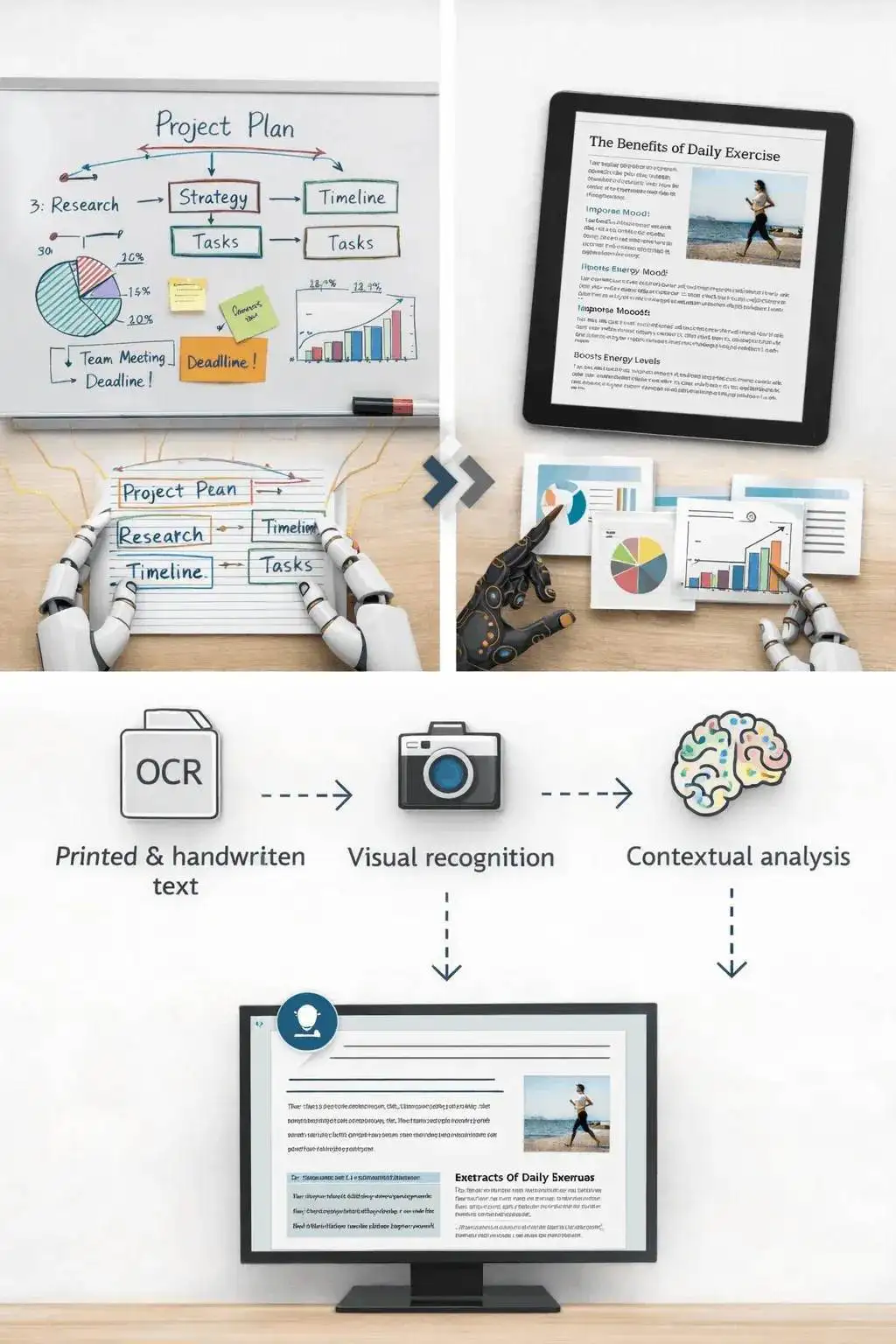
A screenshot of an article, a chart from a report, or a photo of notes usually has a clear structure. The tool can summarize the visible text and explain the main visual context.
It is less reliable on decorative images, screenshots with many tiny panels, or photos where the important content is partly cut off.
- Screenshots: Summarize articles, app screens, social posts, and research snippets.
- Notes: Turn readable handwritten or printed notes into a cleaner written recap.
- Charts: Extract the visible trend or comparison, then verify important numbers manually.
Know when to use another tool
If the image is actually a slide deck export, the PPT summarizer may preserve the presentation structure better. If the file is a PDF document, use a document or paper summarizer instead.
Use the image summarizer when the source is truly visual: a photo, chart, screenshot, scanned note, whiteboard, or diagram.

What affects summary quality
Summaries are a first pass, not a substitute for reviewing important source material. The output improves when the file is readable, complete, and focused.
Good input
A clear screenshot, scanned page, diagram, chart, whiteboard photo, or note image with readable text and enough resolution.
Image clarity matters more than file type. A sharp PNG usually beats a blurry photo.
Charts need readable labels. If a chart is unlabeled or the text is tiny, verify the interpretation manually.
Use this for understanding and notes, not as a final source of truth for contracts, diagnoses, invoices, or compliance work.
Useful ways to use the summary
The best summary gives you a faster route into the material. Use it to decide what deserves closer attention, prepare notes, or turn a long file into a readable starting point.
Summarize screenshots
Turn saved posts, article screenshots, app screens, and research clips into readable notes.
Review visual reports
Get a plain-language first pass on charts, dashboards, and infographics before digging in.
Capture notes
Summarize classroom notes, meeting whiteboards, and photographed pages without retyping everything.
Choose the right summarizer
Use the tool that matches your source file. That keeps the output focused and prevents audio, slide, document, and image workflows from blending together.
| Content | Recommended tool | Izmantojiet tam |
|---|---|---|
| Screenshots, photos, charts, notes, and image files | Attēlu kopsavilkuma veidotājs | Visual summaries, OCR-style extraction, and screenshot notes |
| Video files | Video Summarizer | Summaries from uploaded videos with spoken audio |
| Slides and presentation exports | PPT kopsavilkuma veidotājs | Deck summaries and slide-level notes |
| Word documents and reports | Word dokumentu apkopošanas rīks | Text-heavy document summaries |
Free, no account, and temporary processing
Sceneform bezmaksas rīki neprasa kontu. Normāla lietošana ir neierobežota, ar ļaunprātīgas lietošanas kontroli, kas paredzēta automatizētam vai pārmērīgam trafikai.
Uploaded files are used to create your result and deleted after processing. Avoid uploading files you are not allowed to process, and review summaries before using them for academic, business, medical, legal, or financial decisions.
More Free Tools
Explore other tools to help you download and convert media
YouTube uz MP3
Konvertējiet YouTube videoklipus MP3 audio formātā tieši pārlūkprogrammā. Bez maksas, nav nepieciešams konts.
YouTube uz MP3YouTube uz MP4
Saglabājiet YouTube videoklipus MP4 failos rediģēšanai, pētniecībai vai bezsaistes pārskatīšanai.
YouTube uz MP4YouTube video lejupielādes rīks
Lejupielādējiet YouTube videoklipus, izmantojot vienkāršu pārlūka darbplūsmu, kas paredzēta atkārtotai radītāju pētniecībai.
YouTube video lejupielādes rīksYouTube Shorts lejupielādes rīks
Saglabājiet publiskos YouTube Shorts kā MP4 failus atsaucei, pārskatīšanai vai rediģēšanas darbplūsmām.
YouTube Shorts lejupielādes rīksYouTube sīktēla lejupielādes rīks
Lejupielādējiet pieejamos sīktēlus no publiskiem YouTube videoklipiem un Shorts.
YouTube sīktēla lejupielādes rīksYouTube lietotājvārda ģenerators
Ģenerējiet YouTube kanāla nosaukuma idejas, pamatojoties uz jūsu nišu, auditoriju un pozicionējumu.
YouTube lietotājvārda ģeneratorsYouTube heštagu ģenerators
Pārvērtiet video tēmu par atbilstošiem YouTube heštagiem un iepakojuma idejām.
YouTube heštagu ģeneratorsYouTube apraksta ģenerators
Sagatavojiet YouTube aprakstus ar āķiem, nodaļām, darbības aicinājumiem un heštagiem.
YouTube apraksta ģeneratorsYouTube kopsavilkuma ģenerators
Apkopojiet YouTube videoklipus galvenajos punktos, nodaļās un atkārtojamās piezīmēs.
YouTube kopsavilkuma ģeneratorsYouTube uz tekstu
Pārvērtiet YouTube videoklipus lasāmā tekstā piezīmēm, parakstiem, citātiem un pārveidošanai.
YouTube uz tekstuYouTube uz transkriptu
Iegūstiet lasāmus YouTube transkriptus ar laika zīmogiem, ja tie ir pieejami.
YouTube uz transkriptuYouTube subtitru lejupielādes rīks
Lejupielādējiet pieejamos YouTube subtitrus kā SRT, TXT vai VTT failus.
YouTube subtitru lejupielādes rīksInstagram Reels lejupielādes rīks
Lejupielādējiet publiskos Instagram Reels kā MP4 failus atsaucei, apmācībām vai saviem ierakstiem.
Instagram Reels lejupielādes rīksTikTok video lejupielādes rīks
Lejupielādējiet publiskos TikTok videoklipus MP4 failos radītāju pētniecībai un bezsaistes pārskatīšanai.
TikTok video lejupielādes rīksVideo lejupielādes rīks
Lejupielādējiet publiskos tiešsaistes videoklipus, ja nav piemērota platformas lejupielādes rīka.
Video lejupielādes rīksTikTok transkriptu ģenerators
Pārvērtiet publiskos TikTok videoklipus transkriptu tekstā āķiem, parakstiem un pētniecībai.
TikTok transkriptu ģeneratorsInstagram transkriptu ģenerators
Pārvērtiet publiskos Instagram Reels un videoklipus transkriptu tekstā parakstiem un citātiem.
Instagram transkriptu ģeneratorsFacebook transkriptu ģenerators
Pārvērtiet publiskos Facebook videoklipus un tiešraides atkārtojumus transkriptu tekstā.
Facebook transkriptu ģeneratorsTwitter/X transkriptu ģenerators
Pārvērtiet publiskos Twitter un X video ierakstus transkriptu tekstā citātiem un pētniecībai.
Twitter/X transkriptu ģeneratorsLinkedIn transkriptu ģenerators
Pārvērtiet LinkedIn klipus, vebinārus un intervijas lasāmā transkriptu tekstā.
LinkedIn transkriptu ģeneratorsPinterest transkriptu ģenerators
Pārvērtiet Pinterest video tapas transkriptu tekstā receptēm, apmācībām un piezīmēm.
Pinterest transkriptu ģeneratorsGrāmatas kopsavilkuma veidotājs
Apkopojiet grāmatu nodaļas, piezīmes un garus dokumentus skaidros secinājumos.
Grāmatas kopsavilkuma veidotājsPētniecības darba kopsavilkuma veidotājs
Apkopojiet pētniecības darbus atklājumos, metodēs, ierobežojumos un secinājumos.
Pētniecības darba kopsavilkuma veidotājsPodkāsta kopsavilkuma veidotājs
Pārvērtiet podkāsta audio kopsavilkumos, galvenajos punktos, transkriptos un raidījuma piezīmju melnrakstus.
Podkāsta kopsavilkuma veidotājsPPT kopsavilkuma veidotājs
Pārvērtiet PowerPoint slaidu prezentāciju īsā informatīvajā pārskatā ar galvenajiem punktiem un secinājumiem.
PPT kopsavilkuma veidotājsVideo Summarizer
Apkopojiet videoklipus galvenajos momentos, secinājumos un pārvērtējamos piezīmēs.
Video SummarizerWord dokumentu apkopošanas rīks
Apkopojiet Word dokumentus un ielīmēto tekstu skaidros secinājumos.
Word dokumentu apkopošanas rīksRuna uz tekstu
Pārvērtiet runu, sanāksmes, intervijas un balss piezīmes lasāmā tekstā.
Runa uz tekstuBalss uz tekstu
Pārvērtiet runāto audio tīrā tekstā piezīmēm, scenārijiem, parakstiem un turpinājumiem.
Balss uz tekstuBalss memo uz tekstu
Pārvērtiet balss memos tīrā tekstā piezīmēm, scenārijiem un apkopojumiem.
Balss memo uz tekstuVideo uz tekstu
Pārvērtiet video failus lasāmā tekstā parakstiem, piezīmēm un rediģēšanai.
Video uz tekstuAudio un video konvertori
Konvertējiet audio un video failus starp parastajiem formātiem vienā bezmaksas rīku bibliotēkā.
Audio un video konvertoriImage summarizer in multiple languages
Use the image summarizer in supported Sceneform locales. We will redo localization after the English source copy is stable.
Image Summarizer FAQ
Ready to use the Image Summarizer?
Upload a file, generate a readable summary, then copy or download the result when it is ready.
Summarize a file