Creator
$19/month
Billed monthly
For solo creators posting every week
500 credits every month
- Up to 250 AI images
- Up to 50 Studio exports, plus the first export of each project
- Up to 1.5 hours of AI voiceover
- Roll over up to 1,000 credits
Pick a style. Set when it shows.
Put a hook, a title or a label on your clip, and choose when the words come and go.
Free: iMovie on iPhone or Mac, Edits on Android, Clipchamp, or FFmpeg. Studio is the paid route, with 9 social text styles, transitions and 4K export.
Studio opens on a tablet or computer, not a phone. Studio comes with plans from $19 a month, and each project's first export uses no credits.
Studio's 9 text styles. Pick one to restyle the clip.
Steps from each maker's help page, checked November 5, 2026: Apple iMovie for iPhone, Instagram Edits, Apple iMovie for Mac, Microsoft Clipchamp, FFmpeg drawtext.

A hook for the first seconds, a label while the coffee pours, and a call to action at the end. Each is its own text layer with its own style, start, length and transition. Pick one to jump to it.
Studio runs in the browser on a computer or a tablet. Every plan includes it.
Open Studio and drop your clip onto the timeline.
Add text puts a text layer in the middle of the frame, ready to type. Pasting text onto the canvas works too.
Choose one of the 9 styles under Presets. Then change the font (255 to pick from), size, color, case, outline, shadow and background, and drag the words into place.
Set Start and Duration, or drag the layer on the timeline. Add a transition in Effects. Export MP4 or WebM at 720p, 1080p or 4K.
FFmpeg is free and runs on Windows, Mac and Linux. Replace input.mp4 with your file, the words between the quotes with yours, and 1,4 with the seconds the text should show. The sound is copied as it is. Colons and apostrophes in the words need escaping, so leave them out. If FFmpeg says "Filter not found", your build has no drawtext: it needs one built with libfreetype and libharfbuzz.
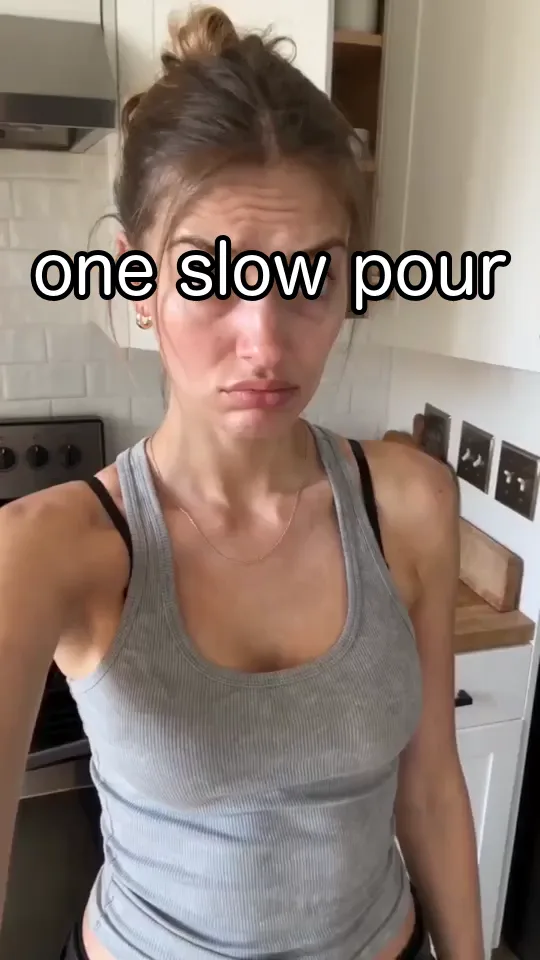
White words with a black outline, from 1 to 4 seconds
ffmpeg -i input.mp4 -vf "drawtext=text='one slow pour':fontsize=h/14:fontcolor=white:borderw=5:bordercolor=black:x=(w-text_w)/2:y=h/4:enable='between(t,1,4)'" -c:a copy output.mp4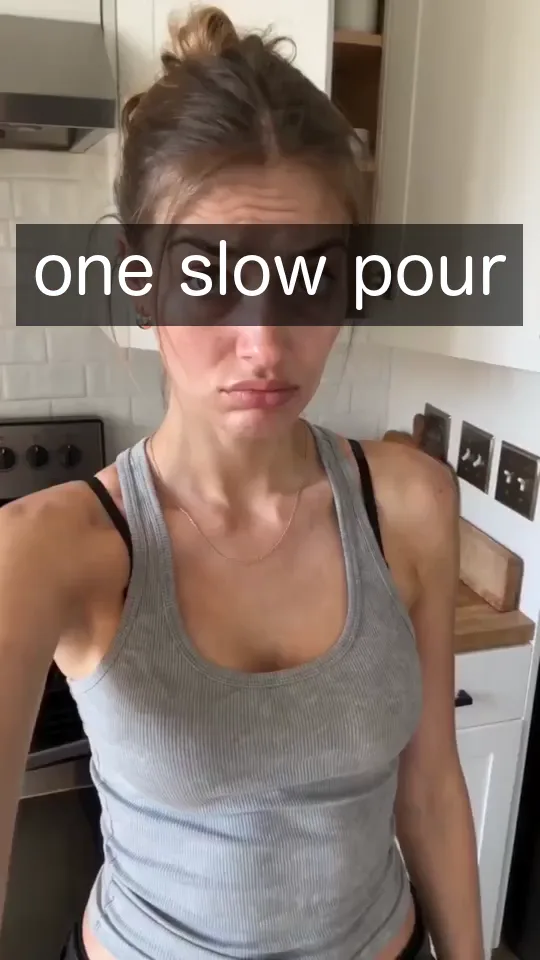
The same words on a dark box
ffmpeg -i input.mp4 -vf "drawtext=text='one slow pour':fontsize=h/14:fontcolor=white:box=1:[email protected]:boxborderw=16:x=(w-text_w)/2:y=h/4:enable='between(t,1,4)'" -c:a copy output.mp4White text disappears on bright or busy footage. The same words, on three kinds of shot, with the four ways Studio's styles keep them readable.

Plain
Faint. White on a pale sky has little contrast.
White text, Shadows switched off.
Shadow
A little better, but a soft shadow can't lift white off a pale sky.
TikTok Classic: a soft shadow under the letters.
Outline
Readable. The black edge draws every letter.
TikTok Outline: a thick black stroke.
Pill
Clearest. The dark pill makes its own background.
Dark Pill: black at 60% behind each line.
In the Captions tab, press Auto captions. Studio listens to the clip and writes each word onto the timeline where it is said. On this review it got all 71 words right.
These captions use Clear Cut, one of 31 caption styles. Text layers are for what you write: hooks, titles and labels. Captions are for what is said. See the video caption generator.
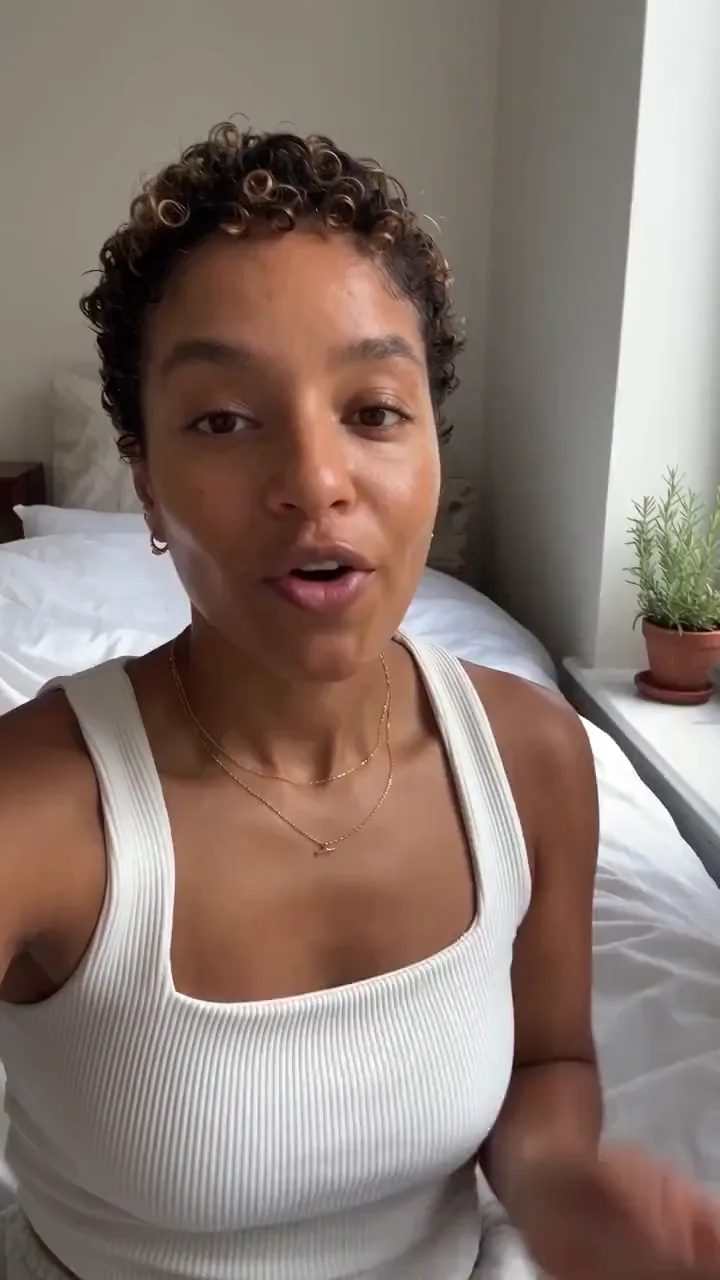
New projects start at 1080 by 1920, the 9:16 shape TikTok, Reels and Shorts use. Press Swap dimensions and the canvas turns 16:9, or type any width and height for a square post. This lower third is two text layers: the name in Instagram Caption, the role in Dark Pill.

Adding text uses no credits. Each project's first export is free. After that an export costs 10 credits, so the $19 Creator plan covers 50 a month.
Pick the plan for how much you post. Every model on every plan. Unused credits roll over. Cancel anytime.
Billed monthly
For solo creators posting every week
500 credits every month
Billed monthly
For creators posting daily across channels
1,300 credits every month
Billed monthly
For brands and production teams
2,700 credits every month
Billed monthly
For agencies running always-on content
5,500 credits every month
Want checkout, comparison tables, or a custom volume? See the full pricing page
Plans from $19 a month. Commercial use included.