Give your photo a different lighting mood
Upload a portrait, product photo, or interior image and describe the light you want. Sceneform generates a new interpretation through Image Editor. Explore soft window light, warmer tones, or a more dramatic side light.
Compare plans and credits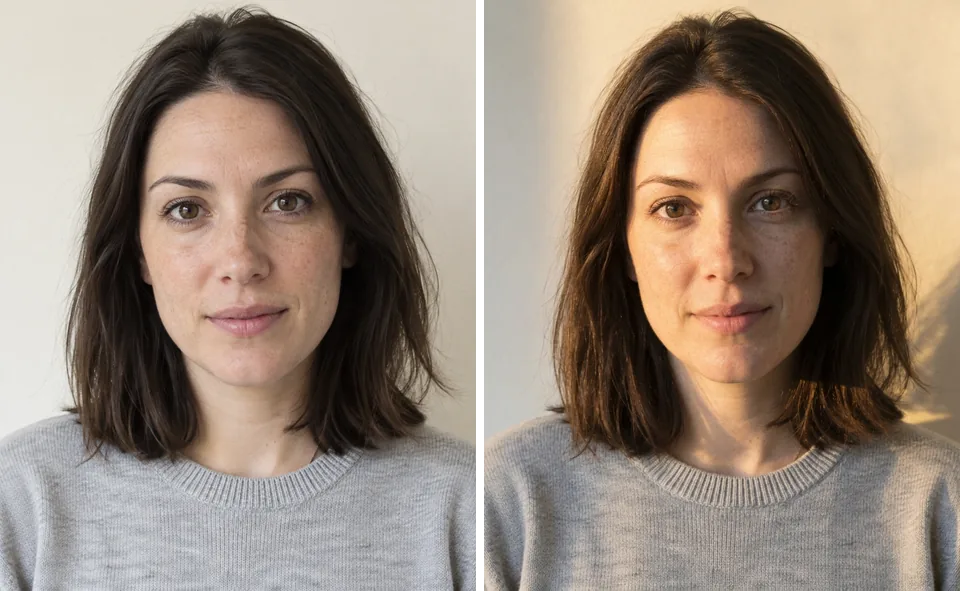
What you can create
Describe the light source
Name the direction and size of the light. Distinguish a broad window from a narrow beam or overhead source.
Explore color and contrast
Request warmer highlights, cooler shadows, or softer contrast. Keep the lighting brief specific enough to compare generated alternatives.
Review light across the scene
Inspect highlights, cast shadows, and reflective surfaces together. Generated relighting can alter objects, textures, or facial details.
From your idea to finished content
Supply the source photo
Upload your image in Image Editor. Identify the subject you want to keep.
Write a lighting brief
Describe the light direction, softness, and color. Ask to retain the composition and important object details.
Compare the generated result
Check whether the new light supports your intended mood. Revise one lighting detail before trying another edit.
Prompts to start with
Use these briefs as a starting point. Replace the details with your own product, audience, and style.
Soft portrait lighting
Relight this portrait with broad window light from camera left. Use gentle shadows and a neutral color balance. Retain the composition, expression, and clothing.
A warm product scene
Give this ceramic mug warm late-afternoon side lighting. Add a soft shadow across the tabletop. Keep the mug shape, handle, and surface pattern consistent with the source.
Frequently asked questions
- How does AI photo relighting work here?
- You supply a photo and describe different lighting. An image editing model generates a revised scene from those instructions.
- Does this simulate a physical lighting setup?
- No. This workflow generates a visual interpretation. It does not calculate measured lighting, lens behavior, or physically exact reflections.
- Can I change the light without changing the subject?
- Ask the model to retain the subject and composition. Check the output because generated edits can change other details.
- Can relighting recover missing image detail?
- Generated lighting edits cannot guarantee recovery of lost detail. Choose a clear source photo and check the credit cost shown next to the Edit button.
Explore related tools
Create your next project
Start with a clear brief. Review the result. Make it yours.