See a new hairstyle concept in your photo
Try a shorter cut, a different fringe, or another hair color through image editing. Start with your photo and describe one change. Treat the result as inspiration for a conversation with your stylist.
Compare plans and credits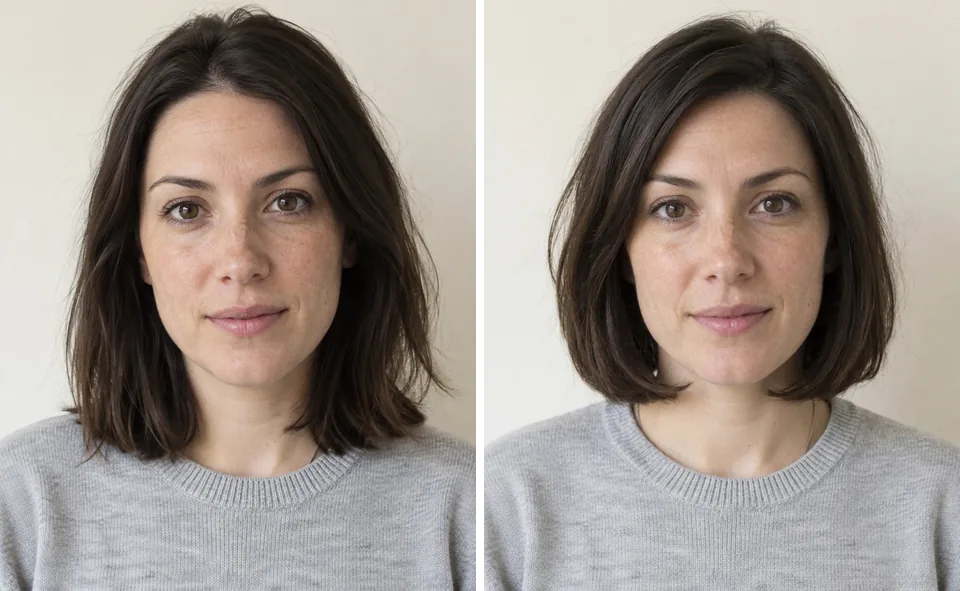
What you can create
Choose a specific shape
Describe the length, parting, fringe, and outline. A precise haircut request gives the model clearer guidance than a style label.
Explore texture and color
Request waves, curls, or a different color. Name the texture and tone separately so you can compare each change.
Use your photo as context
Supply a clear portrait with visible hair. Ask for consistent lighting and facial features, then inspect the generated interpretation.
From your idea to finished content
Choose a clear portrait
Upload a photo where the hairline and current hairstyle are visible. Avoid references with hats or heavy shadows.
Describe the new hairstyle
Specify the desired length and texture. Mention details you want to retain, such as the expression and camera angle.
Review the whole portrait
Check the hairline, ears, face, and background. Save useful concepts and refine unclear instructions before generating another version.
Prompts to start with
Use these briefs as a starting point. Replace the details with your own product, audience, and style.
A shorter shape
Change the hairstyle to a chin-length bob with a side part and softly curved ends. Keep the original hair color. Retain the portrait's expression and soft daylight.
More texture and movement
Give the subject shoulder-length loose waves with a center part. Use a warm chestnut color without bright highlights. Retain the camera angle and background.
Frequently asked questions
- Can I see a short hairstyle before cutting my hair?
- You can generate a short-hair concept from your photo. It provides inspiration, not an accurate prediction of a haircut.
- Can I see how I would look bald?
- Yes. Ask for a completely bald head with a natural scalp, and keep the face, expression, clothing, and background unchanged.
- Does Sceneform have fixed hairstyle presets?
- This workflow uses written instructions and a supplied photo. Describe the hairstyle you want in Image Editor.
- Will the result preserve my face exactly?
- No model guarantees an identical face. Ask the model to retain facial features and check the result before sharing.
- Can I change only the hair color?
- Request the new color and ask to keep the current cut. Image Editor shows the credit cost before you generate.
Explore related tools
Create your next project
Start with a clear brief. Review the result. Make it yours.