YouTube to MP3 converter
Paste a YouTube link and get its sound as a 192 kbit/s MP3, free, with no account and nothing to install. We measured what that MP3 keeps from YouTube's own sound files, and what a 320 kbit/s MP3 would keep.
- Вихідний формат
- MP3, 192 kbit/s
- Limit
- Videos up to 60 minutes
- Link
- Lasts one day
Як конвертувати YouTube в MP3
- 01
Copy the video link
On a computer, copy the address from your browser. In the YouTube app, tap Share, then Copy link.
- 02
Paste it and confirm
Paste the link, tick the permission checkbox, and finish the security check.
- 03
Convert and download
Press Convert. When the card says your file is ready, press Download to save the MP3.
What the MP3 is
An MP3 at a constant 192 kbit/s, about 1.4 MB a minute, with no quality setting. What it holds depends on which of YouTube's sound files it was made from.
On the live tool, in the 24 hours to 2026-11-19 14:37 UTC, 1,811 MP3s were made from YouTube's Opus sound file, 736 from the sound inside a video file and 7 from its AAC sound file.
On our test machine YouTube only ever handed over a video file, so the four MP3s we made with this tool on 19 November 2026 came from the sound inside it. These four were stereo, with the sample rates below:
Big Buck Bunny © Blender Foundation, CC BY 3.0. The other three are NASA videos.
Is a 320 kbps MP3 from YouTube better?
A higher bitrate can't bring back what YouTube's file never had. It can keep more of what the file has: for the clip below, a 320 kbit/s MP3 kept sound up to 20.1 kHz and a 192 kbit/s one up to 18.8 kHz. This tool writes 192 kbit/s only.
For our test videos YouTube listed stereo sound as AAC at about 130 kbit/s and Opus at 117 to 144 kbit/s. Compare what each file keeps, not the bitrate printed on it.
From YouTube's Opus file, the usual case. Our test machine never received the Opus file through the tool, so we made both MP3s from Big Buck Bunny's Opus file on the tool's server, with the tool's own FFmpeg settings.
YouTube's Opus sound
10.2 MB
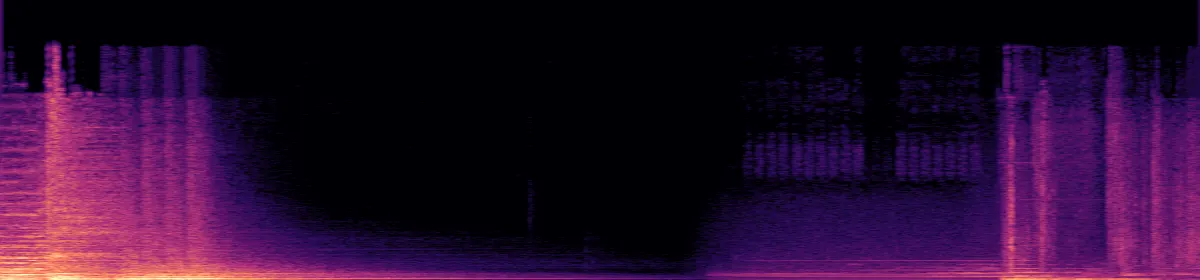 10 kHzReaches 20.2 kHz
MP3 at 192 kbit/s, the tool's settings
15.2 MB
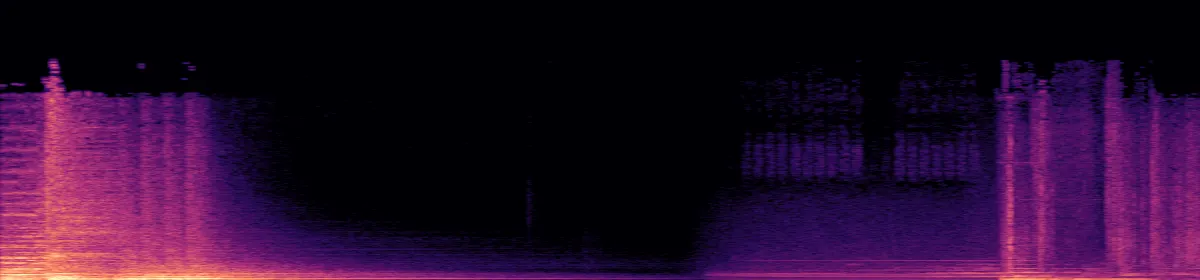 10 kHzStops at 18.8 kHz
MP3 at 320 kbit/s
25.4 MB
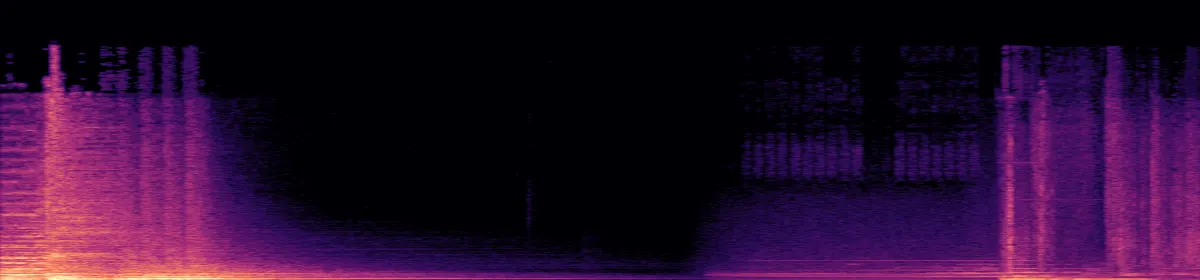 10 kHzStops at 20.1 kHz
From the sound inside a video file. That is what our test machine got. For Big Buck Bunny the sound inside YouTube's 360p file is the same 128 kbit/s AAC as YouTube's AAC sound file; for NASA's Moon Base update it is 96 kbit/s. Here the MP3 the tool returned and a 320 kbit/s MP3 we made from the same AAC both stop where the AAC stops.
YouTube's AAC sound
10.3 MB
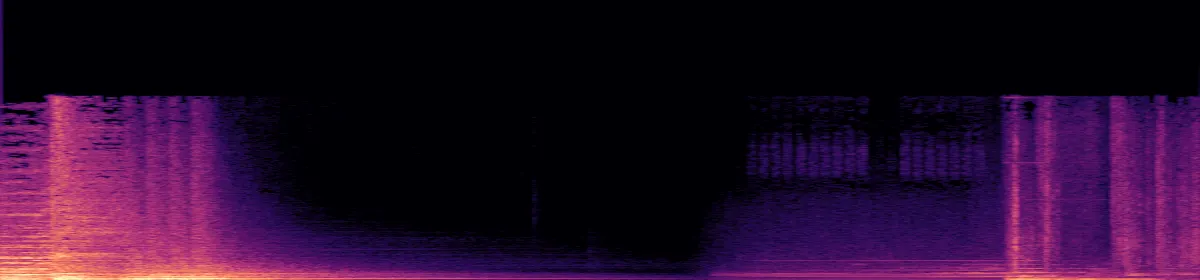 20 kHz10 kHzStops at 15.9 kHz
The MP3 this tool returned
15.2 MB
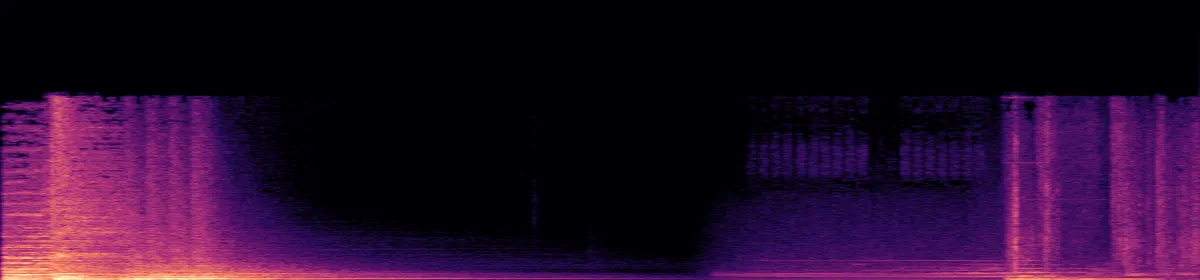 20 kHz10 kHzStops at 16 kHz
MP3 at 320 kbit/s
25.4 MB
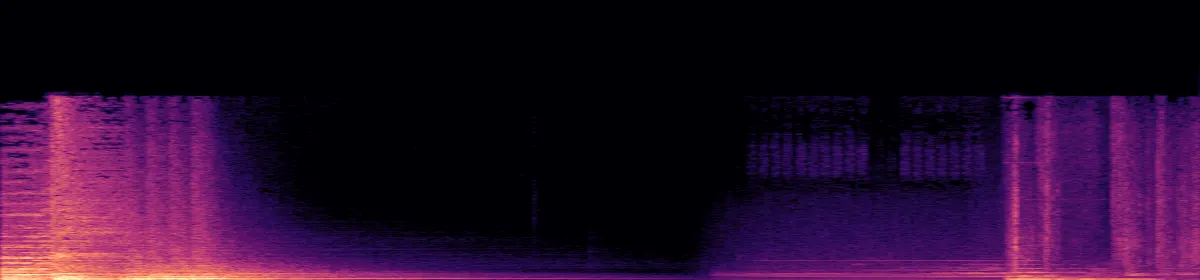 20 kHz10 kHzStops at 16 kHz
"Stops at" and "reaches" are measured over these 8 seconds: the frequency above which every 100 Hz band sits at least 50 dB below the average level between 1 and 4 kHz. A stricter or looser threshold moves each figure by a few hundred hertz. Big Buck Bunny © Blender Foundation, CC BY 3.0.
Does the MP3 have the title and thumbnail?
No. The MP3 carries no title, artist or cover picture.
We read the tags of every MP3 we made with this tool: each held only the encoder's name and three leftover fields from YouTube's video file. yt-dlp can put the title and the thumbnail inside the MP3. We ran this command as printed: the MP3 came out at about 117 kbit/s, with the title, the channel name as artist, and the thumbnail as its cover. It failed once with HTTP Error 403 and worked on the second run.
yt-dlp -x --audio-format mp3 --embed-metadata --embed-thumbnail "https://www.youtube.com/watch?v=aqz-KE-bpKQ"Which sound track a dubbed video gives
In our test, the original one. There is no track menu.
NASA's eclipse Short lists 20 dubbed tracks besides its English original, from Arabic to Ukrainian. We lined the MP3 up against the tracks: it matched the English original and neither the Arabic nor the Japanese dub. The tool asks YouTube for its best sound file and names no language.
Other ways to get the sound of a YouTube video
This yt-dlp command saves YouTube's Opus file as it is. We ran it as printed: it saved a 10.1 MB .opus file that reaches 20.2 kHz by the measure above.
yt-dlp -x "https://www.youtube.com/watch?v=aqz-KE-bpKQ"Is this YouTube to MP3 converter safe?
Nothing installs: the page runs in your browser and asks for no account.
We watched one conversion in a browser. Pressing Convert opened no new tab or window, kept the page on this site and started no download while it converted. When it finished, the card offered one Download button for the MP3.
When a video won't convert
Most common first, from this tool's failed jobs in the 24 hours to 2026-11-19 10:40 UTC.
- "This video isn't available. It may have been removed, so check the link."
- The API's unavailable category, 79 times in that span. We got it for a link to a video that doesn't exist.
- "This video is longer than 60 minutes, the most this tool takes. Try a shorter video."
- 70 times in that span. We got it for NASA's 96-minute Moon Base update.
- "This hit a temporary problem. Try again in a moment."
- Shown for failures the tool marks as worth retrying. NASA's 9-minute Moon Base update failed this way three times in a row on our test machine, then converted about an hour later.
- "This video is age-restricted, so it can't be fetched."
- 14 times in that span: some age-restricted videos fail when YouTube asks for a sign-in. Another age-restricted video we tried converted.
- "This video is private. Use a link to a public video."
- We got this for a video its owner set to private.
- "Live streams can't be saved. Try again after the stream ends."
- We got this for NASA's live view from the space station.
- "Use an HTTPS video link from YouTube, TikTok, or Instagram."
- The form shows this for a YouTube Music link. Change music.youtube.com to www.youtube.com and paste it again.
For the video itself, use YouTube to MP4. For the words, use the YouTube transcript tool.
Turn an idea into a video
Give Storybook a topic or an article link. It makes an illustrated video with narration and music.
More in YouTube
All 42 toolsSave a YouTube video as an H.264 and AAC MP4, up to 720p.
Download a YouTube video as an MP4 at 360p, 480p or 720p, with what each size weighs.
Download a Short as an MP4, up to 720 on the short side, with nothing added to the picture.
Save a YouTube video's thumbnail as a JPG in any of five sizes, up to 1280 × 720.
Writes 10 channel name ideas from your name and topic. It doesn't check if they're taken.
Writes hashtags from a few words about your video, in a language you pick from a menu of 73.
Drafts a YouTube description from your topic or script, for long-form or short-form videos.
Paste a YouTube link and get a summary of the video's English captions.
Перетворіть відео YouTube в читаний текст для нотаток, субтитрів, цитат та переробки.
Paste a YouTube link to get the video's English captions as a transcript. Copy it or save TXT or SRT.
Get a YouTube video's English subtitles as a timed SRT file or plain TXT.
YouTube to MP3 questions
In other languages
- English YouTube to MP3 Converter
- العربية محول يوتيوب إلى MP3
- Български YouTube към MP3 конвертор
- Čeština Konvertor YouTube na MP3
- Dansk YouTube til MP3-konverter
- Deutsch YouTube zu MP3 Konverter
- Ελληνικά Μετατροπέας YouTube σε MP3
- Español Conversor de YouTube a MP3
- Eesti YouTube MP3 muundur
- Suomi YouTube MP3 -muunnin
- Français Convertisseur YouTube vers MP3
- Magyar YouTube MP3 konvertáló
- Indonesia Konverter YouTube ke MP3
- Italiano Convertitore YouTube in MP3
- 日本語 YouTube から MP3 変換
- 한국어 YouTube에서 MP3로 변환기
- Latviešu YouTube uz MP3 pārveidotājs
- Norsk bokmål YouTube til MP3-konverterer
- Nederlands YouTube naar MP3 converter
- Norsk YouTube til MP3-konverter
- Polski Konwerter YouTube do MP3
- Português Conversor YouTube para MP3
- Română Convertor YouTube în MP3
- Русский Конвертер YouTube в MP3
- Slovenčina YouTube do MP3 konvertor
- Slovenščina Pretvornik YouTube v MP3
- Svenska YouTube till MP3-omvandlare
- Türkçe YouTube’dan MP3’e Dönüştürücü
- Українська Конвертер YouTube в MP3
- 中文 YouTube 转 MP3 转换器