MP4 to MP3 converter
Choose an MP4 and download its sound as an MP3, free and with no account. From 44.1 or 48 kHz sound the MP3 is 192 kbit/s, 1.44 MB a minute; it keeps the video's title and artist and drops the picture.
- Input
- MP4 files
- Вихідний формат
- MP3, up to 192 kbit/s
- Limit
- Up to 500 MB
- Price
- Free, no account
How to convert MP4 to MP3
- 01
Choose your MP4
Drop it on the box. The limit is 500 MB.
- 02
Check what changes
The table under your file shows the MP3's size, sound and tags.
- 03
Download the MP3
The link lasts one day.
Will the MP3 sound worse than the video?
It can't sound better: converting adds nothing.
We ran the Sintel trailer through this converter. Its sound already stops near 15.4 kHz, and the MP3 stops at the same place. Subtract the MP3 from the original and what is left is 26 dB quieter than the music.
The video's sound
175 KB
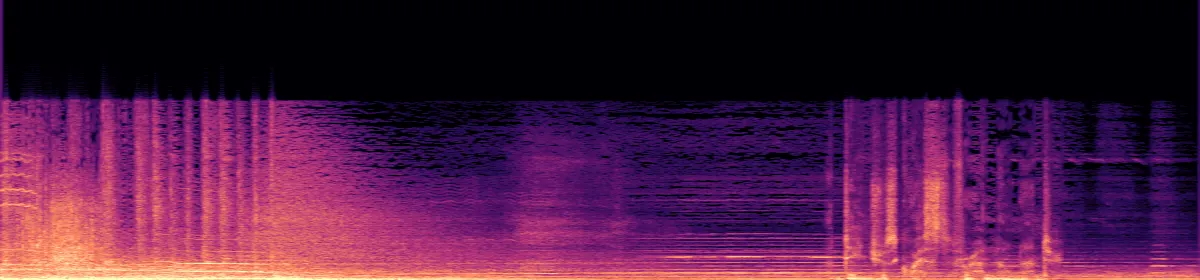 20 kHz10 kHzStops near 15.4 kHz
The MP3
242 KB
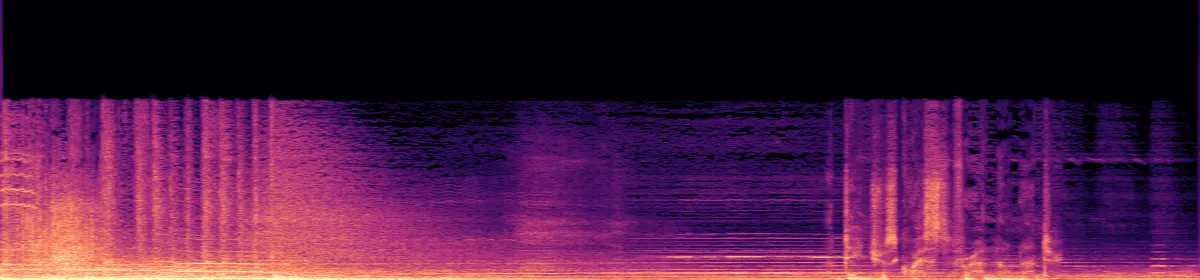 20 kHz10 kHzSame place
Would 320 kbit/s sound better? We tried it on the trailer. The file was 1.7 times bigger, its top edge stayed at 15.4 kHz, and the difference from the original fell from 26 dB to 38 dB below the music. This converter makes 192 kbit/s only.
Sintel trailer © Blender Foundation, durian.blender.org, CC BY 3.0.
How big will the MP3 be?
- MP314.4 MB
- M4A14.6 MB
- WAV115 MB
One minute of the trailer's 48 kHz stereo sound in each format; the picture's resolution doesn't count. The MP3 is this size for sound at 32 kHz or more and smaller below that. Quiet sound makes a smaller M4A.
Convert on your computer
For an MP4 over the limit, or a whole folder, convert on your computer.
- QuickTime Player on a Mac
- File›Export As›Audio Only
It saves M4A, not MP3.
- FFmpeg on any computer
The same command this converter runs.
ffmpeg -i in.mp4 -vn -codec:a libmp3lame -b:a 192k out.mp3- FFmpeg, every MP4 in a folder
Run it in the folder, in Terminal on a Mac or Linux.
for f in *.mp4; do ffmpeg -i "$f" -vn -codec:a libmp3lame -b:a 192k "${f%.mp4}.mp3"; done
If the conversion doesn't work
- The video has no sound track
- There is nothing to extract, so the conversion fails.
Related file conversions
Turn an idea into a video
Give Storybook a topic or an article link. It makes an illustrated video with narration and music.
More in Конвертери
All 42 toolsMP4 to MP3 questions
All file converters
Search convertersFrom MP4
Video converters
- 3GP to MOV
- 3GP to MP4
- AVI to FLV
- AVI to MOV
- AVI to MP4
- AVI to MPEG
- AVI to WMV
- FLV to MOV
- FLV to MP4
- FLV to MPEG
- FLV to WMV
- MKV to AVI
- MKV to MOV
- MKV to MP4
- MKV to MPEG
- MKV to WMV
- MOV to AVI
- MOV to FLV
- MOV to MKV
- MOV to MP4
- MOV to MPEG
- MOV to WebM
- MOV to WMV
- MPEG to AVI
- MPEG to MOV
- MPEG to MP4
- TS to AVI
- TS to MP4
- WebM to MOV
- WebM to MP4
- WMV to MOV
- WMV to MP4
- WMV to MPEG