AAC to AIFF converter
Turn an AAC or M4A file into uncompressed AIFF for Logic Pro, GarageBand, a sampler or a CD. Free, one file up to 200 MB, no account.
- Input
- AAC files
- Uitvoer
- AIFF, 16-bit PCM
- Limit
- Up to 200 MB
- Price
- Free, no account
How to convert AAC to AIFF
- 01
Choose your AAC file
Drop it on the box or pick it from your device. The limit is 200 MB per file.
- 02
Check what changes
The table under your file shows the AIFF's size, audio and tags. Select Convert, and a short security check runs first.
- 03
Download the AIFF
Select Download when the conversion finishes. Download links expire after one day.
Will the AIFF sound better than the AAC?
No. The AIFF holds the same sound, in a format more apps can edit.
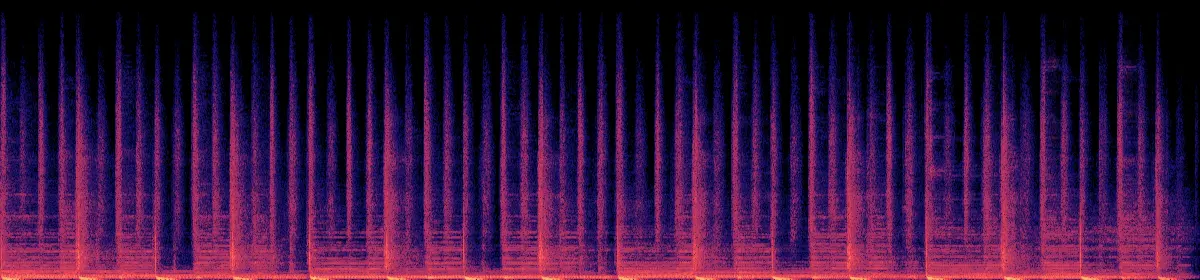
AAC removes detail when a file is first encoded, mostly high frequencies you hear least. The AIFF stores what the AAC decodes to as 16-bit samples, so nothing comes back. You get a file that samplers, CD tools and older editors accept, and that you can cut and re-save without losing more quality. Logic Pro and GarageBand also import AAC directly.
Original recording
1.6 MB
 20 kHz10 kHz
Your AAC
147 KB
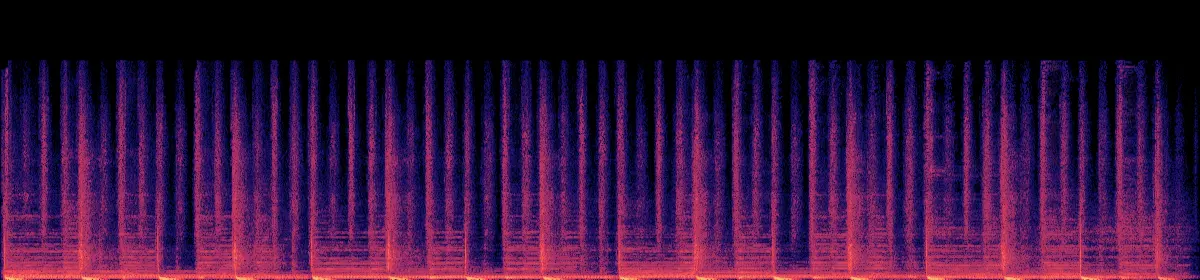 20 kHz10 kHzRemoved above about 17 kHz
The AIFF
1.6 MB
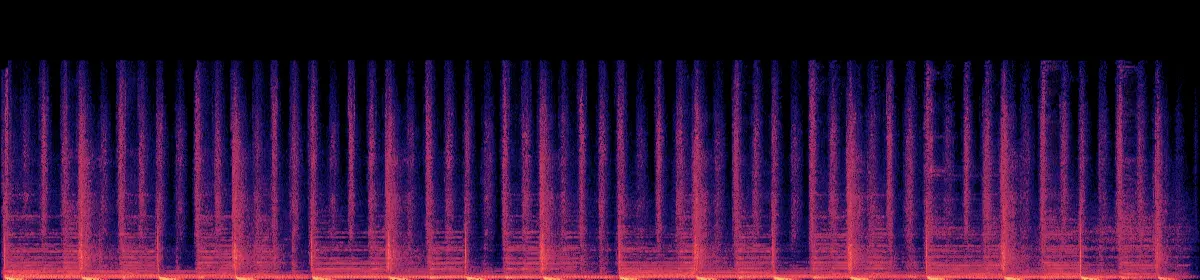 20 kHz10 kHzStill missing
AAC vs AIFF
AAC is lossy: it removes detail to make the file about 10 times smaller. AIFF is Apple's uncompressed format and stores every sample. Converting from AAC to AIFF gives you the size of AIFF and the detail of the AAC.
How big will the AIFF be?
- AAC3.8 MB
- AIFF42.3 MB
11×bigger, with the same sound
Sample rate × 2 bytes × channels × seconds. AIFF doesn't compress, so the music makes no difference. Only the length, sample rate and channels do.
What's inside the AIFF you download
Is AIFF right for where it's going?
AIFF works in Logic Pro
Drag the AIFF into the Tracks area, or use File › Import › Audio File. Logic can also import the AAC directly, so convert when you want a fixed PCM file for heavy editing.
Other ways to convert AAC to AIFF
Music app on a Mac
Music › Settings › Files › Import Settings › AIFF Encoder
Then select the song and choose File › Convert › Create AIFF Version. Protected Apple Music downloads can't be converted.
Audacity, any computer
File › Export Audio › AIFF
Audacity needs the free FFmpeg library installed to open AAC files.
FFmpeg, for a whole folder
ffmpeg -i in.aac -c:a pcm_s16be out.aiffThe same command this converter runs.
If the conversion doesn't work
- "This file type isn't supported here"
- The file is probably an .m4p: a song downloaded from Apple Music, or an iTunes Store purchase from before 2009. Those are copy-protected, so this converter can't open them. Songs saved as .m4a or .aac convert normally.
- The AIFF won't play in Chrome
- Chrome can't play AIFF, so a downloaded AIFF opened in a browser tab shows an error. The file is fine. Open it in Music, QuickTime Player, VLC or your editor.
- "Choose a file under 200 MB"
- A 200 MB AAC at 128 kbps is about three and a half hours. Split a longer recording in an editor and convert each part.
- "The security check expired"
- Refresh the page, choose the file again, and select Convert.
- "Couldn't find this request"
- Download links expire after one day. Convert the AAC again for a new link.
Related file conversions
Turn an idea into a video
Give Storybook a topic or an article link. It makes an illustrated video with narration and music.