OGG to MP3 converter
Convert OGG to MP3 free: a 192 kbit/s MP3 for 44.1 or 48 kHz audio, about 1.1 times the size of our quality-5 test OGG. Two things we measured: on that clip the MP3 dropped the detail the OGG kept above 18.7 kHz, and the OGG's title, artist and album didn't carry over.
- Input
- OGG files
- Output
- MP3, 192 kbps at 44.1 or 48 kHz
- Limit
- Up to 200 MB
- Price
- Free, no account
How to convert OGG to MP3
- 01
Choose your OGG file
Drop it on the box or pick it from your device. The limit is 200 MB per file.
- 02
Check what changes
The table under your file shows the size, sound and tags of MP3. Select Convert, and a short security check runs first.
- 03
Download the MP3
Select Download when the conversion finishes. The link expires after one day.
Will the MP3 sound worse than the OGG?
It can't sound better. Both are lossy, so the MP3 is a second encode of what the OGG decodes to. Here is how far it moved.
We made a quality-5 OGG from a lossless recording and ran it through this converter. The OGG kept detail to about 20.8 kHz; the MP3 stops near 18.7 kHz. Subtract the MP3 from the OGG and what is left sits 25.7 dB below the music.
Original recording
1.4 MB
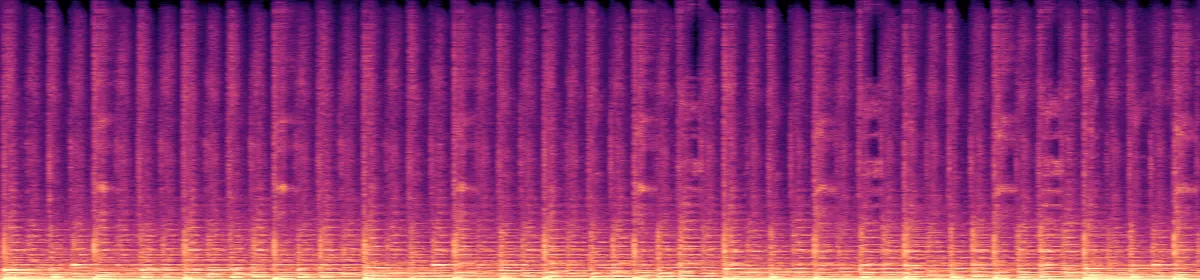 20 kHz10 kHz
Your OGG
175 KB
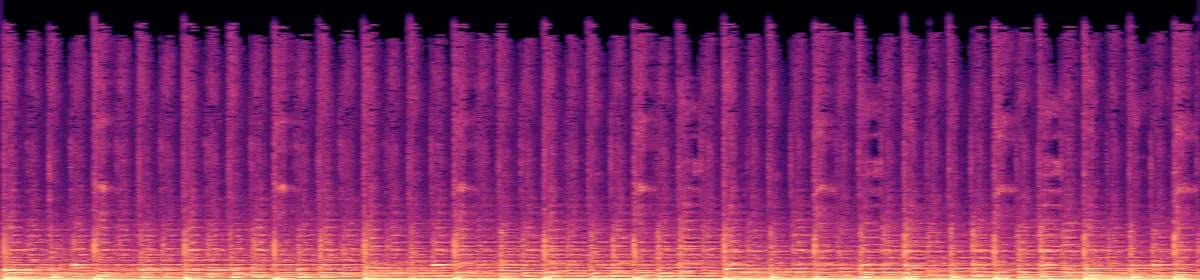 10 kHzStops near 20.8 kHz
The MP3
194 KB
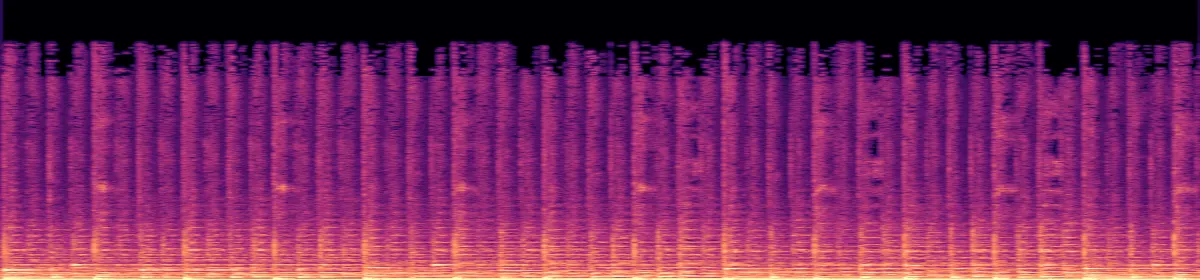 10 kHzStops near 18.7 kHz
Against the lossless original, the OGG's difference sat 24.4 dB below the music and the MP3's 22.2 dB.
Why are the title and artist gone?
The converter doesn't copy an OGG's tags into the MP3. We tested a tagged OGG: all six tags were lost.
An OGG keeps its tags with the audio stream, and the converter's command copies only tags stored for the whole file. If the tags matter, add them back in your music app, or convert with the FFmpeg command below, which copies them.
- Tags
- Title, artist, album, year, track, genrebecomes All lost
- Sample rate
- Your file'sbecomes Unchanged up to 48 kHz
- Channels
- Your file'sbecomes Stereo at most, 5.1 mixed down
How big will the MP3 be?
Our quality-5 music OGG grew a little and our Opus voice note grew several times over: the MP3 is 192 kbit/s at 44.1 or 48 kHz, whatever the OGG used.
A quality-5 Vorbis OGG, about 175 kbit/s1.1 times the size
A mono Opus voice note, 32 kbit/s5.7 times the size
OGG vs MP3
An OGG holds Vorbis or Opus, both open lossy codecs. On our test music the OGG kept more high detail than the MP3 at a slightly lower bitrate. MP3 is the safer choice for players and apps: Apple's iPhone format list names MP3 and not Vorbis or Opus, and Safari plays OGG only from version 18.4.
Convert on your computer
- FFmpeg, a whole folder with its tags
This converter's command plus -map_metadata, which copies the OGG's tags, run on every OGG in the folder. We checked one file: all six tags arrived.
for f in *.ogg; do ffmpeg -nostdin -i "$f" -map_metadata 0:s:a:0 -vn -codec:a libmp3lame -b:a 192k "${f%.ogg}.mp3"; done- Audacity, any computer
- File›Export Audio›MP3
Audacity opens Ogg Vorbis without add-ons.
If the conversion doesn't work
- "This file type isn't supported here"
- The converter takes .ogg, not .opus or .ogx. An .opus file is Opus audio in an Ogg file, so renaming it to .ogg lets it convert; we tested one.
- "Choose a file under 200 MB"
- Split a longer recording in an editor and convert each part, or use FFmpeg.
Related file conversions
Turn an idea into a video
Give Storybook a topic or an article link. It makes an illustrated video with narration and music.
More in Konvertere
All 42 toolsOGG to MP3 questions
All file converters
Search convertersFrom OGG
Any format
Video converters
- 3GP to MOV
- 3GP to MP4
- AVI to FLV
- AVI to MOV
- AVI to MP4
- AVI to MPEG
- AVI to WMV
- FLV to MOV
- FLV to MP4
- FLV to MPEG
- FLV to WMV
- MKV to AVI
- MKV to MOV
- MKV to MP4
- MKV to MPEG
- MKV to WMV
- MOV to AVI
- MOV to FLV
- MOV to MKV
- MOV to MP4
- MOV to MPEG
- MOV to WebM
- MOV to WMV
- MP4 to AVI
- MP4 to FLV
- MP4 to MKV
- MP4 to MOV
- MP4 to MPEG
- MP4 to WebM
- MP4 to WMV
- MPEG to AVI
- MPEG to MOV
- MPEG to MP4
- TS to AVI
- TS to MP4
- WebM to MOV
- WebM to MP4
- WMV to MOV
- WMV to MP4
- WMV to MPEG