Make the cover explain why the video matters.
Create an original thumbnail with Sceneform's image generator. Build the composition around one subject and one clear idea. Use reference images when a recognizable person or product connects the cover to your video.
Compare plans and credits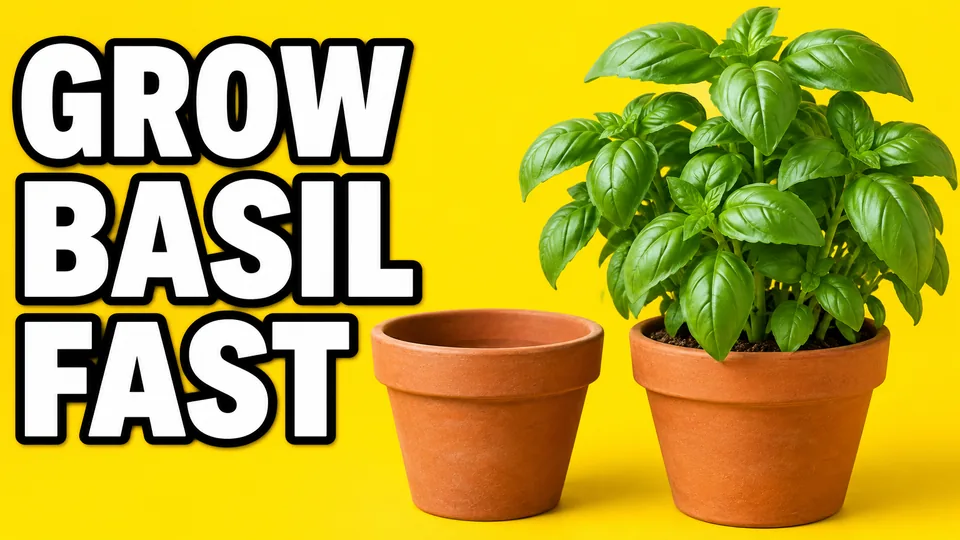
What you can create
Give the subject room
Ask for a composition that keeps the main subject clear at small sizes. Avoid packing every part of the video into one cover.
Plan space for the headline
Describe where the subject and text should sit. Keep the headline short and inspect any generated lettering before you publish.
Use a recognizable reference
Compatible models accept image references for a person or product. Keep the cover accurate to what viewers will find in the video.
From your idea to finished content
Choose the thumbnail's main idea
Write down the video's central question or result. Pick one subject that communicates that idea without requiring a long explanation.
Generate the composition
Choose an image model and a suitable landscape format. Describe the subject, background, color contrast, and headline placement.
Review it at a small size
Check that the subject stays recognizable and any text remains readable. Confirm the cover accurately represents the video before uploading it.
Prompts to start with
Use these briefs as a starting point. Replace the details with your own product, audience, and style.
A gardening tutorial cover
Video cover showing one healthy basil plant beside an empty pot. Bright simple background. Large clear subjects, space for a short headline.
A product walkthrough cover
Use the reference backpack as the main subject on the right. Pale studio background. Show its front pocket clearly. Leave the left empty.
Frequently asked questions
- Does this download thumbnails from existing videos?
- No. This workflow generates original cover images. Sceneform has a separate YouTube thumbnail downloader for retrieving existing video thumbnails.
- Can AI add the headline to the thumbnail?
- Some image models support text rendering. Use a short headline and check spelling, placement, and readability in the generated result.
- Can I include my face or product?
- Choose a model that accepts image references. Provide a clear source image and check whether the result preserves the important details.
- Will a new thumbnail increase views?
- A thumbnail cannot guarantee more views. Compare different covers using your publishing platform's available performance or testing tools.
Explore related tools
Create your next project
Start with a clear brief. Review the result. Make it yours.