MP4 to WMV converter
Choose an MP4 and download a WMV with Windows Media Video 8 and WMA sound. The converter uses FFmpeg's default WMV settings: our 52-second test trailer came out 7% smaller and scored 0.972 on SSIM, where 1 is identical, with visible blocks in busy scenes.
- Input
- MP4 files
- Вихідний формат
- WMV, Windows Media Video 8 and WMA
- Limit
- Up to 500 MB
- Price
- Free, no account
How to convert MP4 to WMV
- 01
Choose your MP4
Drop it on the box. The limit is 500 MB.
- 02
Check what changes
The table under your file shows what the WMV keeps and what it drops.
- 03
Download the WMV
The link lasts one day.
Does converting MP4 to WMV lose quality?
Yes, visibly in busy scenes: at FFmpeg's default WMV settings, fine detail turns into blocks.
In the Sintel trailer's close-up, the stones of the alley become flat squares.
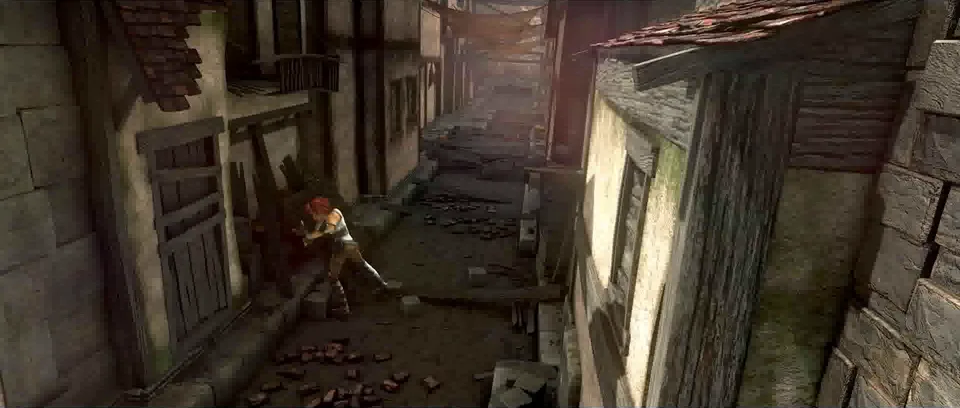
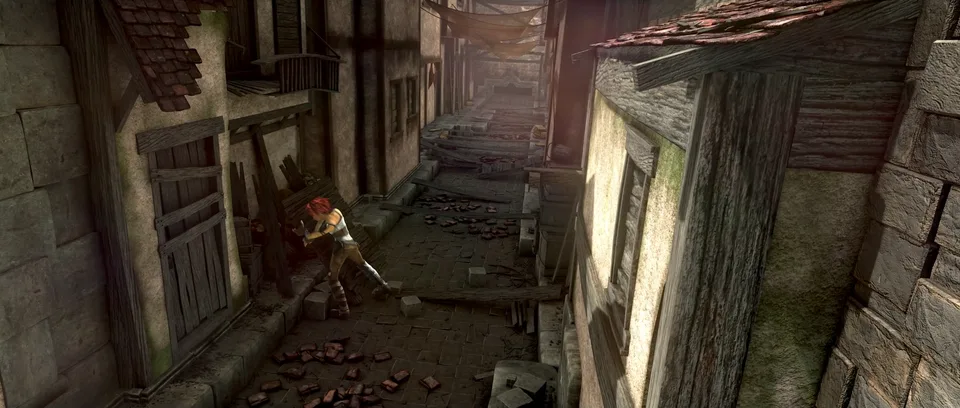
A WMV without the blocks
At FFmpeg's quality 5 for WMV, the trailer scored 0.992 instead of 0.972, in 33.8 MB instead of 13.6 MB.
The pictured frame went from 0.871 to 0.973. That is the first command under Convert on your computer.
What the WMV keeps
Our test browser, Chromium, the open-source base of Chrome, opened none of the WMVs we made, at the converter's settings or at quality 2 and 5.
- Picture
- Any size and frame ratebecomes Same size and frame rate
- Video
- Your MP4'sbecomes Windows Media Video 8
- Sound
- Stereo tracksbecomes WMA, every track
- 5.1 sound
- Six channelsbecomes The conversion fails
- Subtitles
- Anybecomes Dropped
Where is the WMV going?
You don't need a WMV.
Media Player on Windows 11 plays H.264 MP4 without an extension.
Keep the MP4.
Adobe lists WMV import on Windows only. MP4 imports on Windows and Mac.
Upload the MP4.
YouTube takes WMV, and recommends MP4 with H.264 and AAC.
Convert, at a set quality.
Windows Media Player opens .wmv files. For a program that takes nothing else, use the quality 5 command below.
Convert on your computer
- FFmpeg, at quality 5
Lower numbers keep more: quality 2 scored 0.997 on the trailer, in 59.4 MB.
ffmpeg -i in.mp4 -map 0:v:0 -map 0:a? -c:v wmv2 -q:v 5 -c:a wmav2 -b:a 192k out.wmv- FFmpeg, for an MP4 with 5.1 sound
Mixes every track down to stereo, which WMA 2 can hold. Big Buck Bunny's stereo and 5.1 tracks became two stereo WMA tracks.
ffmpeg -i in.mp4 -map 0:v:0 -map 0:a? -c:v wmv2 -q:v 5 -c:a wmav2 -b:a 192k -ac 2 out.wmv- FFmpeg, as this converter runs it
The command behind this page.
ffmpeg -i in.mp4 -map 0:v:0? -map 0:a? -codec:v wmv2 -codec:a wmav2 out.wmv
If the conversion doesn't work
- The conversion fails
- One cause we measured is 5.1 sound. This converter's WMA 2 encoder takes at most two channels, and the converter doesn't mix down. Use the 5.1 command above.
Related file conversions
Turn an idea into a video
Give Storybook a topic or an article link. It makes an illustrated video with narration and music.
More in Конвертери
All 42 toolsMP4 to WMV questions
All file converters
Search convertersAny format
Video converters
- 3GP to MOV
- 3GP to MP4
- AVI to FLV
- AVI to MOV
- AVI to MP4
- AVI to MPEG
- AVI to WMV
- FLV to MOV
- FLV to MP4
- FLV to MPEG
- FLV to WMV
- MKV to AVI
- MKV to MOV
- MKV to MP4
- MKV to MPEG
- MOV to AVI
- MOV to FLV
- MOV to MKV
- MOV to MP4
- MOV to MPEG
- MOV to WebM
- MOV to WMV
- MPEG to AVI
- MPEG to MOV
- MPEG to MP4
- TS to AVI
- TS to MP4
- WebM to MOV
- WebM to MP4
- WMV to MOV
- WMV to MP4
- WMV to MPEG