MP4 to MOV converter
Choose an MP4 and download a MOV with H.264 video and AAC sound, free and without an account. The picture is re-encoded, so the MOV is close to the MP4 but not identical: our 52-second test trailer scored 0.990 on SSIM, where 1 is identical, and came out 20% bigger.
- Input
- MP4 files
- Вихідний формат
- MOV, H.264 and AAC
- Limit
- Up to 500 MB
- Price
- Free, no account
How to convert MP4 to MOV
- 01
Choose your MP4
Drop it on the box. The limit is 500 MB.
- 02
Check what changes
The table under your file shows what the MOV keeps and what it drops.
- 03
Download the MOV
The link lasts one day.
Does converting MP4 to MOV lose quality?
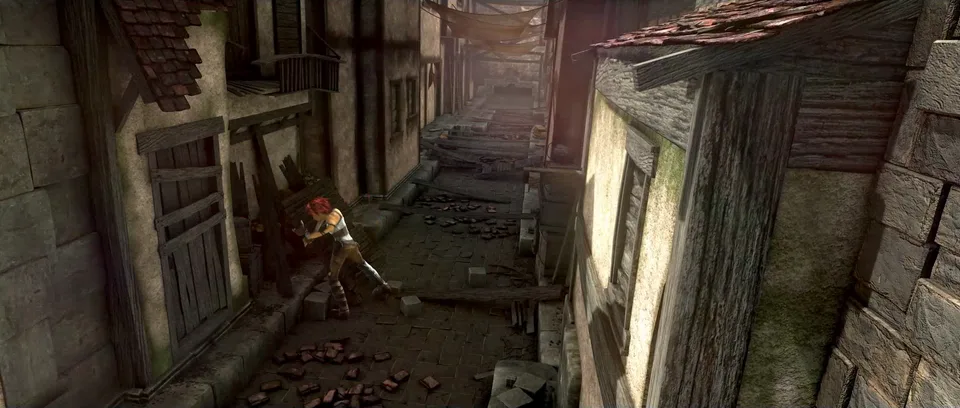
Yes, the frames change. This converter re-encodes the picture, so the MOV is close to the MP4 but not the same.
In the Sintel trailer's MOV, fine texture like the stones and wood grain in the close-up below goes soft.

Will the MOV be bigger than the MP4?
It depends on the MP4. Two of our three test files grew and one shrank.
The trailer and our HEVC MP4 grew; our 4K MP4 shrank. Every MOV gets the same H.264 setting, x264's fastest preset at CRF 28, whatever the MP4 spent.
What the MOV keeps
- Picture
- Any sizebecomes Same size
- Frame rate
- Anybecomes Same
- Video
- Your MP4'sbecomes H.264, re-encoded
- Sound
- Every trackbecomes Every track, as AAC (128 kbit/s target)
- Subtitles
- Anybecomes Dropped
Where is the MOV going?
You don't need a MOV.
Final Cut Pro imports MP4 with H.264 or HEVC as it is.
You don't need a MOV.
Adobe lists both MP4 and MOV among the files Premiere imports.
Upload the MP4.
YouTube takes both, and recommends MP4 with H.264 and AAC.
Convert to MOV.
If an app or a delivery spec only takes .mov, this converter makes an H.264 one, which played in our test browser, Chromium, the open-source base of Chrome. For the same frames, use the copy command below.
Convert on your computer
An MP4 with H.264 fits in a MOV as it is. FFmpeg's copy command moves the streams over without re-encoding, so every frame stays the same.
- Trailer MP4
- First frame checksum 9b2c4088acb2c896d5d79adbe4b893ac
- 14.6 MB
- Copied MOV
- First frame checksum 9b2c4088acb2c896d5d79adbe4b893ac
- 14.6 MB
- FFmpeg, same frames
Copies every stream as it is.
ffmpeg -i in.mp4 -map 0 -c copy out.mov- QuickTime Player on a Mac
- File›Export As›1080p
Saves a MOV with H.264 or HEVC. It re-encodes.
- FFmpeg, as this converter runs it
The command behind this page.
ffmpeg -i in.mp4 -map 0:v:0? -map 0:a? -codec:v libx264 -preset ultrafast -crf 28 -codec:a aac -b:a 128k -threads 0 out.mov
If the conversion doesn't work
- "Choose a file under 500 MB."
- Use the FFmpeg copy command above: on your computer it has no size limit.
- The MOV is bigger than the MP4
- The converter's H.264 setting is x264's fastest preset. Copy the streams with FFmpeg instead to keep the original size.
Related file conversions
Turn an idea into a video
Give Storybook a topic or an article link. It makes an illustrated video with narration and music.
More in Конвертери
All 42 toolsMP4 to MOV questions
All file converters
Search convertersAny format
Video converters
- 3GP to MOV
- 3GP to MP4
- AVI to FLV
- AVI to MOV
- AVI to MP4
- AVI to MPEG
- AVI to WMV
- FLV to MOV
- FLV to MP4
- FLV to MPEG
- FLV to WMV
- MKV to AVI
- MKV to MP4
- MKV to MPEG
- MKV to WMV
- MOV to AVI
- MOV to FLV
- MOV to MKV
- MOV to MP4
- MOV to MPEG
- MOV to WebM
- MOV to WMV
- MPEG to AVI
- MPEG to MOV
- MPEG to MP4
- TS to AVI
- TS to MP4
- WebM to MP4
- WMV to MOV
- WMV to MP4
- WMV to MPEG