AAC to MP3 converter
Convert AAC to MP3 free: you get an MP3 at 192 kbit/s for 44.1 or 48 kHz audio. On our 128 kbit/s test clip the MP3 came out 1.5 times the size and still stopped at the AAC's 17.3 kHz, so the conversion changes compatibility, not what the audio holds.
- Input
- AAC files
- Έξοδος
- MP3, 192 kbps at 44.1 or 48 kHz
- Limit
- Up to 200 MB
- Price
- Free, no account
How to convert AAC to MP3
- 01
Choose your AAC file
Drop it on the box or pick it from your device. The limit is 200 MB per file.
- 02
Check what changes
The table under your file shows the size, sound and tags of MP3. Select Convert, and a short security check runs first.
- 03
Download the MP3
Select Download when the conversion finishes. The link expires after one day.
Will the MP3 sound worse than the AAC?
On our 128 kbit/s test clip, the MP3 stops where the AAC did, near 17.3 kHz. Subtract the MP3 from the AAC and what is left sits 26.4 dB below the music.
The MP3 is made from what the AAC decodes to, so nothing above that line comes back. Against the lossless original, the AAC's difference sat 21.8 dB below the music and the MP3's 20.6 dB.
Original recording
1.4 MB
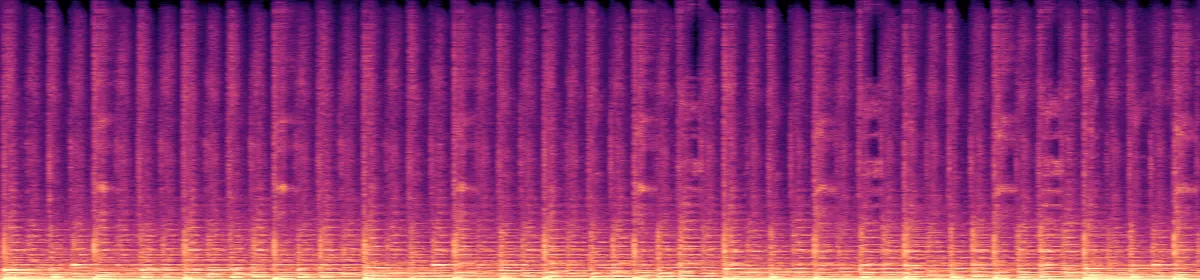 20 kHz10 kHz
The AAC
130 KB
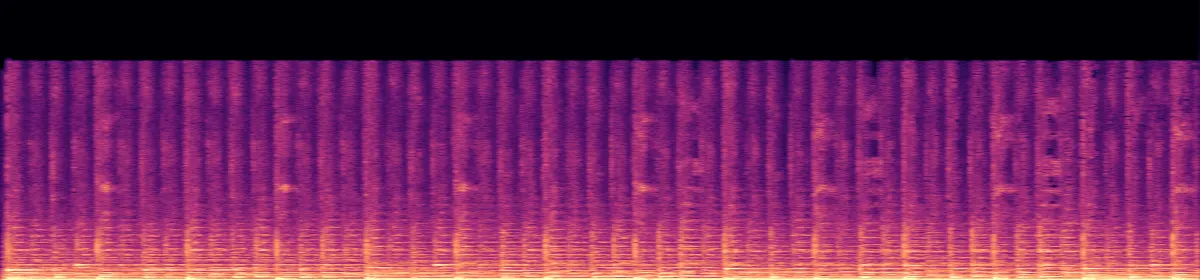 10 kHzStops near 17.3 kHz
The MP3
194 KB
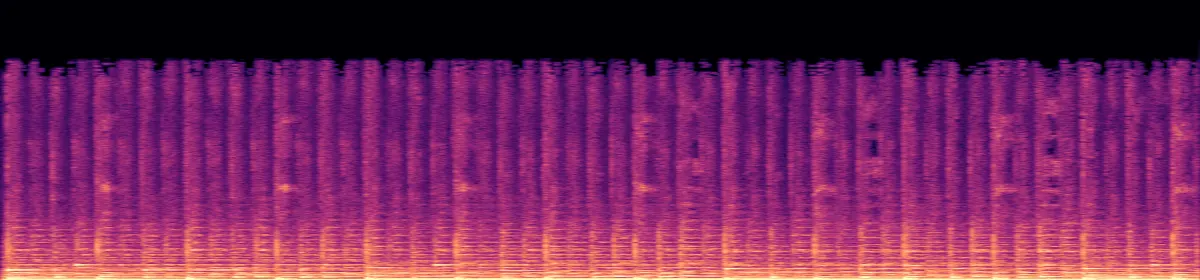 10 kHzStill missing
Will the MP3 be bigger?
Bigger than a 128 kbit/s AAC, smaller than a surround one. The MP3 is 192 kbit/s for sound at 44.1 or 48 kHz, and at most stereo. Sizes are from our test clips.
The surround row is a 384 kbit/s 5.1 AAC we encoded from the Big Buck Bunny soundtrack (© Blender Foundation, peach.blender.org, CC BY 3.0).
A 128 kbit/s stereo AAC1.5 times the size
A 384 kbit/s 5.1 AAC, mixed down to stereo50% smaller
What is an .aac file?
AAC audio with almost no wrapper: no tags, no cover and no stored length.
MDN describes the format, ADTS, as an almost bare stream of AAC frames, each with a small header, meant for streamed audio. You also get one when the sound of an MP4 is copied out without re-encoding.
We copied the Sintel trailer's sound out of its MP4 with FFmpeg. The MP4's title, artist and copyright didn't come along, and FFmpeg guessed the 52-second track at 63 seconds, because nothing in the file says how long it is. The MP3 stores its length: our 8-second AAC read as 8.29 seconds, its MP3 as 8.07.
AAC vs MP3
AAC is the newer codec. At 128 kbit/s it kept our test music to 17.3 kHz, MP3 to 16.6 kHz. Both play on iPhone and in Windows Media Player 12, by Apple's and Microsoft's own lists. Convert when an app or device asks for MP3.
What else changes
- Sample rate
- Your file'sbecomes Unchanged up to 48 kHz
- Channels
- Mono or stereobecomes Unchanged
- Channels
- 5.1becomes Mixed down to stereo
Convert on your computer
- FFmpeg, one file
The same command this converter runs.
ffmpeg -i in.aac -vn -codec:a libmp3lame -b:a 192k out.mp3- FFmpeg, for a whole folder
The same command, run on every AAC file in the folder.
for f in *.aac; do ffmpeg -nostdin -i "$f" -vn -codec:a libmp3lame -b:a 192k "${f%.aac}.mp3"; done
If the conversion doesn't work
- The MP3 has no title or artist
- A raw .aac has nowhere to keep them, so there were none to copy. Add them in your music app or a tag editor.
- "Choose a file under 200 MB"
- At the size of our 128 kbit/s test clip, 200 MB holds about 3.6 hours. Cut a longer file into parts first, or use FFmpeg.
Related file conversions
Turn an idea into a video
Give Storybook a topic or an article link. It makes an illustrated video with narration and music.
More in Μετατροπείς
All 42 toolsAAC to MP3 questions
All file converters
Search convertersFrom AAC
Any format
Video converters
- 3GP to MOV
- 3GP to MP4
- AVI to FLV
- AVI to MOV
- AVI to MP4
- AVI to MPEG
- AVI to WMV
- FLV to MOV
- FLV to MP4
- FLV to MPEG
- FLV to WMV
- MKV to AVI
- MKV to MOV
- MKV to MP4
- MKV to MPEG
- MKV to WMV
- MOV to AVI
- MOV to FLV
- MOV to MKV
- MOV to MP4
- MOV to MPEG
- MOV to WebM
- MOV to WMV
- MP4 to AVI
- MP4 to FLV
- MP4 to MKV
- MP4 to MOV
- MP4 to MPEG
- MP4 to WebM
- MP4 to WMV
- MPEG to AVI
- MPEG to MOV
- MPEG to MP4
- TS to AVI
- TS to MP4
- WebM to MOV
- WebM to MP4
- WMV to MOV
- WMV to MP4
- WMV to MPEG