AVI to WMV converter
Choose an AVI and download a WMV with Windows Media Video 8 and WMA sound. The converter sets no bitrate, so our 720p test AVI came out at 0.75 Mbit/s with an SSIM of 0.962, where 1 is identical, and blocky in fine detail.
- Input
- AVI files
- Изход
- WMV, Windows Media Video 8 and WMA
- Limit
- Up to 500 MB
- Price
- Free, no account
How to convert AVI to WMV
- 01
Choose your AVI
Drop it on the box. The limit is 500 MB.
- 02
Check what changes
The box then lists what the WMV will hold.
- 03
Download the WMV
The link lasts one day.
Does converting AVI to WMV lose quality?
Yes, in fine detail. The converter leaves the bitrate to FFmpeg's WMV2 encoder, which settled at 0.75 Mbit/s for 720p.
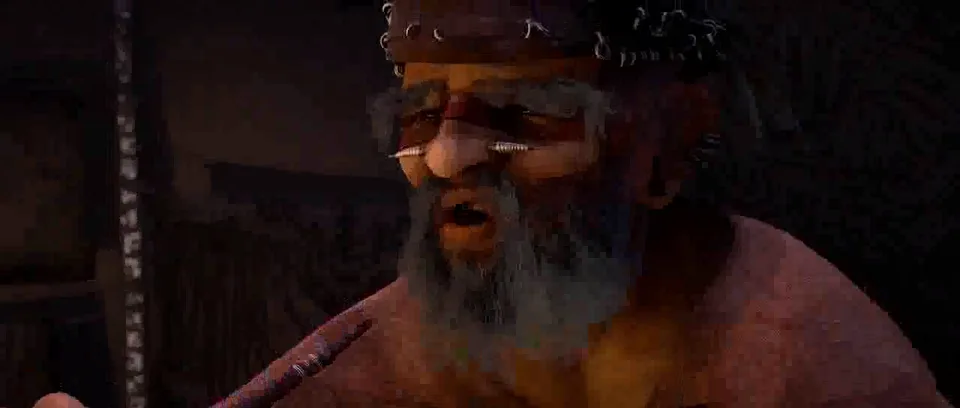
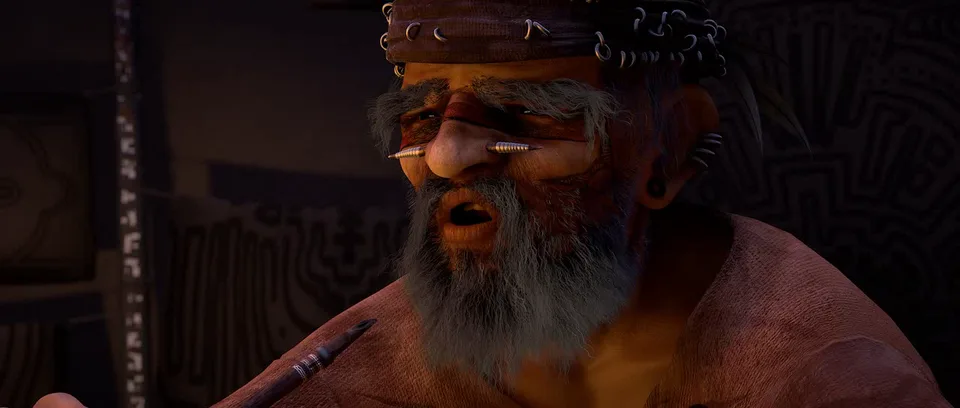
We made an Xvid AVI of the Sintel trailer and converted it: 14.5 MB became 6.0 MB, with an SSIM of 0.962 over all its frames. Hair and texture turn to blocks, like the beard below.
Where is the WMV going?
Use the H.264 command below.
Microsoft recommends MP4 with H.264 and AAC, deprecates WMV from PowerPoint version 2505, and doesn't support WMV in PowerPoint for Mac. AVI to MP4 copied our test AVI as it was, Xvid and MP3, so re-encode it with the command below instead.
The WMV plays.
Microsoft lists WMV among the formats Media Player plays out of the box. Xvid, the video in our test AVI, isn't on that list.
Not this WMV.
Sony's XAV-AX3200 lists WMV3 and WVC1, in .wmv or .avi files, up to 720 × 480. The converter writes WMV2.
Convert on your computer
- FFmpeg, H.264 and AAC in an MP4 for PowerPoint
Re-encodes the Xvid and MP3. Our test AVI came out at 11.7 MB, with H.264 video and AAC sound.
ffmpeg -i in.avi -map 0:v:0 -map 0:a? -c:v libx264 -crf 20 -preset medium -pix_fmt yuv420p -c:a aac -b:a 160k -movflags +faststart out.mp4- FFmpeg, WMV at a set quality
Our test AVI came out at 17.6 MB instead of 6.0 MB, with an SSIM of 0.994. -ac 2 mixes surround sound to stereo.
ffmpeg -i in.avi -map 0:v:0 -map 0:a? -c:v wmv2 -q:v 4 -c:a wmav2 -b:a 192k -ac 2 out.wmv- FFmpeg, as this converter runs it
The command behind the frames above.
ffmpeg -i in.avi -map 0:v:0? -map 0:a? -codec:v wmv2 -codec:a wmav2 out.wmv
If the conversion doesn't work
- It fails on a film with surround sound
- This converter's WMA 2 encoder takes at most two channels, so it stopped on our Xvid AVI with 5.1 AC-3 sound. The WMV command above mixes it to stereo first.
Related file conversions
Turn an idea into a video
Give Storybook a topic or an article link. It makes an illustrated video with narration and music.
More in Конвертори
All 42 toolsAVI to WMV questions
All file converters
Search convertersFrom AVI
Any format
Video converters
- 3GP to MOV
- 3GP to MP4
- FLV to MOV
- FLV to MP4
- FLV to MPEG
- MKV to AVI
- MKV to MOV
- MKV to MP4
- MKV to MPEG
- MOV to AVI
- MOV to FLV
- MOV to MKV
- MOV to MP4
- MOV to MPEG
- MOV to WebM
- MOV to WMV
- MP4 to AVI
- MP4 to FLV
- MP4 to MKV
- MP4 to MOV
- MP4 to MPEG
- MP4 to WebM
- MPEG to AVI
- MPEG to MOV
- MPEG to MP4
- TS to AVI
- TS to MP4
- WebM to MOV
- WebM to MP4
- WMV to MOV
- WMV to MP4
- WMV to MPEG