WAV to MP3 converter
Convert WAV to MP3 free: a 192 kbit/s MP3 from a 44.1 or 48 kHz WAV, with its title, artist and album. From our 16-bit 44.1 kHz stereo test clip the MP3 was 14% of the WAV's size and stopped near 18.7 kHz, and the rest of the difference sat 25.4 dB below the music.
- Input
- WAV files
- Izhod
- MP3, 192 kbps at 44.1 or 48 kHz
- Limit
- Up to 200 MB
- Price
- Free, no account
How to convert WAV to MP3
- 01
Choose your WAV file
Drop it on the box or pick it from your device. The limit is 200 MB per file.
- 02
Check what changes
The table under your file shows the size, sound and tags of MP3. Select Convert, and a short security check runs first.
- 03
Download the MP3
Select Download when the conversion finishes. The link expires after one day.
What does the MP3 leave out?
The highest frequencies, and small changes everywhere else. Keep the WAV if you will edit the audio again.
We ran a 16-bit 44.1 kHz stereo WAV of our test music through this converter. The MP3 stops near 18.7 kHz. Subtract it from the WAV and what is left sits 25.4 dB below the music.
Your WAV
1.4 MB
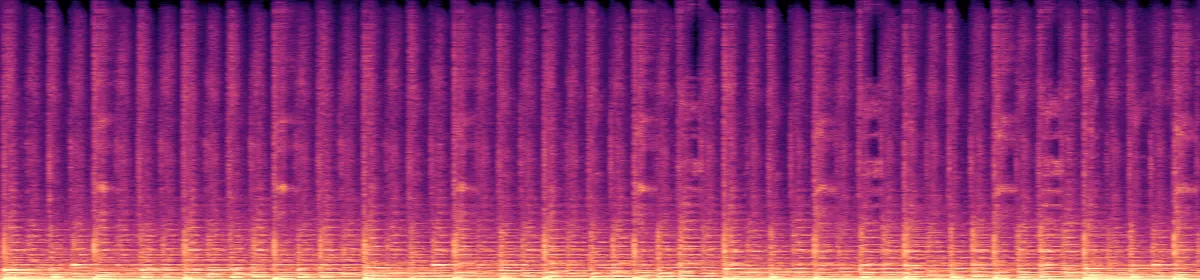 20 kHz10 kHz
The MP3
194 KB
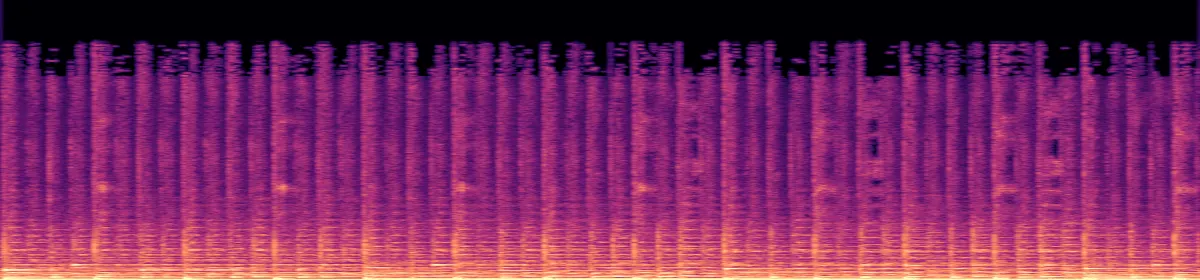 10 kHzRemoved above 18.7 kHz
How much smaller is the MP3?
About seven times smaller for a CD-quality WAV, more for a 24-bit one, and far less for a voice recording at 16 kHz, where the MP3 drops to 160 kbit/s.
A 16-bit 44.1 kHz stereo WAV, CD quality86% smaller
A 24-bit 48 kHz stereo WAV, as editors export92% smaller
A 16-bit 44.1 kHz mono WAV73% smaller
A 16-bit 16 kHz mono voice recording36% smaller
What else changes
- Tags
- Title, artist, album, year, track, genrebecomes All kept
- Sample rate
- 32 to 48 kHzbecomes Unchanged, 192 kbit/s
- Sample rate
- 16 to 24 kHzbecomes Unchanged, 160 kbit/s
- Sample rate
- Below 16 kHzbecomes Unchanged, 64 kbit/s
- Sample rate
- 88.2 or 96 kHzbecomes 48 kHz, the most MP3 holds
- Channels
- Monobecomes Mono, at the same bitrate as stereo
- Channels
- 5.1becomes Mixed down to stereo
Convert on your computer
- Audacity, any computer
- File›Export Audio›MP3
Audacity opens WAV and exports MP3 without add-ons.
- FFmpeg, for a whole folder
This converter's own command, run on every WAV in the folder.
for f in *.wav; do ffmpeg -nostdin -i "$f" -vn -codec:a libmp3lame -b:a 192k "${f%.wav}.mp3"; done
If the conversion doesn't work
- "Choose a file under 200 MB"
- 200 MB is about 19 minutes of CD-quality WAV. Split a longer recording, or convert it with Audacity or FFmpeg.
Related file conversions
Turn an idea into a video
Give Storybook a topic or an article link. It makes an illustrated video with narration and music.
More in Pretvorniki
All 42 toolsWAV to MP3 questions
All file converters
Search convertersFrom WAV
Video converters
- 3GP to MOV
- 3GP to MP4
- AVI to FLV
- AVI to MOV
- AVI to MP4
- AVI to MPEG
- AVI to WMV
- FLV to MOV
- FLV to MP4
- FLV to MPEG
- FLV to WMV
- MKV to AVI
- MKV to MOV
- MKV to MP4
- MKV to MPEG
- MKV to WMV
- MOV to AVI
- MOV to FLV
- MOV to MKV
- MOV to MP4
- MOV to MPEG
- MOV to WebM
- MOV to WMV
- MP4 to AVI
- MP4 to FLV
- MP4 to MKV
- MP4 to MOV
- MP4 to MPEG
- MP4 to WebM
- MP4 to WMV
- MPEG to AVI
- MPEG to MOV
- MPEG to MP4
- TS to AVI
- TS to MP4
- WebM to MOV
- WebM to MP4
- WMV to MOV
- WMV to MP4
- WMV to MPEG