OGG to WAV converter
Convert OGG to WAV free: you get 16-bit PCM at the OGG's sample rate, 8 times the size of our quality-5 Vorbis test OGG, with every sample equal to its decode rounded to 16 bits. The OGG's title, artist and album are not carried over.
- Input
- OGG files
- Выходной формат
- WAV, 16-bit PCM
- Limit
- Up to 200 MB
- Price
- Free, no account
How to convert OGG to WAV
- 01
Choose your OGG file
Drop it on the box or pick it from your device. The limit is 200 MB per file.
- 02
Check what changes
The table under your file shows the size, sound and tags of WAV. Select Convert, and a short security check runs first.
- 03
Download the WAV
Select Download when the conversion finishes. The link expires after one day.
Will the WAV sound better than the OGG?
No. Our quality-5 test OGG kept detail up to about 20.8 kHz, and its WAV stops at the same place.
All 705,600 samples of the WAV equal the OGG's decode rounded to 16 bits. That OGG's difference from the original recording sat 24.4 dB below the music, and the WAV is no closer.
Original recording
1.4 MB
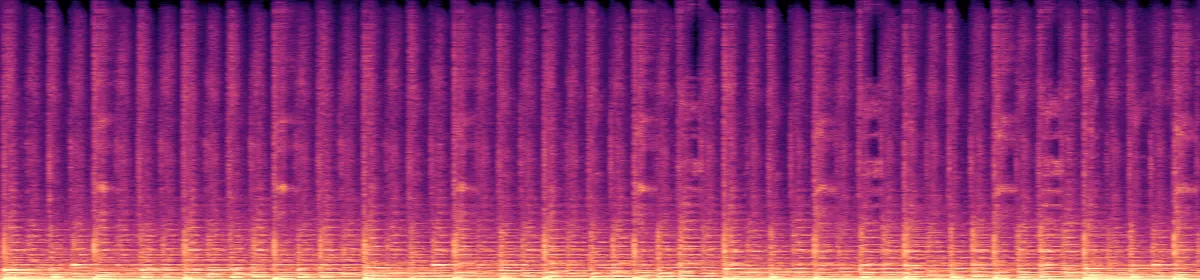 20 kHz10 kHz
Test OGG
175 KB
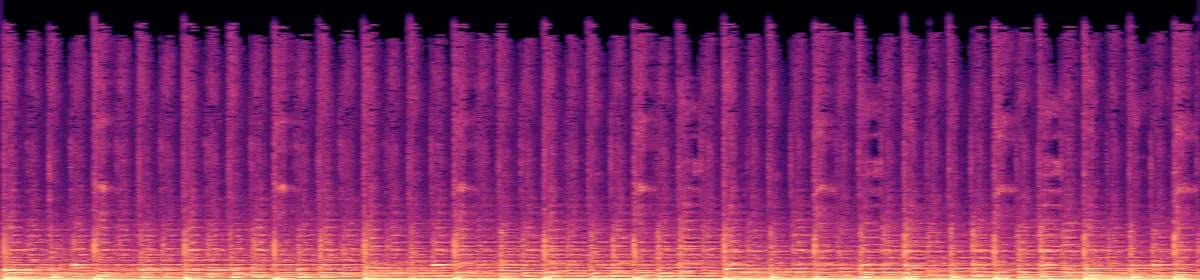 10 kHzRemoved above 20.8 kHz
Its WAV
1.4 MB
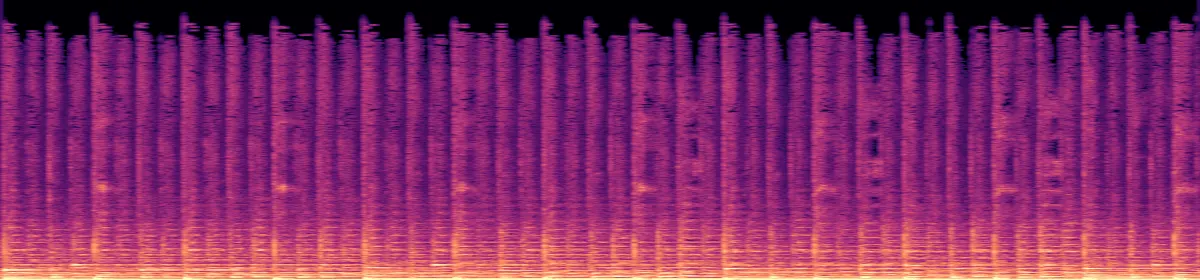 10 kHzStill missing
How big will the WAV be?
10.6 MB per minute of 16-bit stereo at 44.1 kHz. The smaller the OGG, the bigger the jump.
A quality-5 Vorbis OGG, stereo 44.1 kHz8.0 times the size
A mono Opus voice note, 32 kbit/s23 times the size
When is WAV the better file?
In a game that plays many short sounds at once. Godot suggests WAV for short, repetitive sound effects.
Godot's documentation says WAV is light on the CPU, with hundreds of sounds playing at once, but takes a lot of disk space. Ogg Vorbis is much smaller and needs more processing to play, so Godot suggests it for music, speech and long effects.
What else changes
The tags. FFmpeg reads an OGG's title, artist and album as part of the audio stream, which this converter's command doesn't copy, so the WAV has none.
The FFmpeg commands below add one option that copies them. We tested it: all six came back. An .ogg can also hold FLAC instead of Vorbis or Opus; a 24-bit one loses its lowest 8 bits in the 16-bit WAV.
- Tags
- Title, artist, album, year, track, genrebecomes All lost
- Samples
- Vorbis or Opusbecomes The decode, as 16-bit
- Samples
- 24-bit FLAC in Oggbecomes Cut to 16-bit
- Sample rate and channels
- Your file'sbecomes Unchanged
Convert on your computer
- FFmpeg, one file, keeping the tags
The converter's command plus -map_metadata, which copies the OGG's tags.
ffmpeg -i in.ogg -vn -map_metadata 0:s:a:0 -codec:a pcm_s16le out.wav- FFmpeg, for a whole folder
The same, in a loop over the OGGs in the current folder (macOS and Linux shells).
for f in *.ogg; do ffmpeg -i "$f" -vn -map_metadata 0:s:a:0 -codec:a pcm_s16le "${f%.ogg}.wav"; done- Audacity, any computer
- File›Export Audio›WAV
Audacity opens Ogg Vorbis without add-ons.
If the conversion doesn't work
- "This file type isn't supported here"
- The converter takes .ogg, not .opus or .ogx. An .opus file is Opus audio in an Ogg file, so renaming it to .ogg lets it convert; we tested one.
Related file conversions
Turn an idea into a video
Give Storybook a topic or an article link. It makes an illustrated video with narration and music.
More in Конвертеры
All 42 toolsOGG to WAV questions
All file converters
Search convertersFrom OGG
Any format
Video converters
- 3GP to MOV
- 3GP to MP4
- AVI to FLV
- AVI to MOV
- AVI to MP4
- AVI to MPEG
- AVI to WMV
- FLV to MOV
- FLV to MP4
- FLV to MPEG
- FLV to WMV
- MKV to AVI
- MKV to MOV
- MKV to MP4
- MKV to MPEG
- MKV to WMV
- MOV to AVI
- MOV to FLV
- MOV to MKV
- MOV to MP4
- MOV to MPEG
- MOV to WebM
- MOV to WMV
- MP4 to AVI
- MP4 to FLV
- MP4 to MKV
- MP4 to MOV
- MP4 to MPEG
- MP4 to WebM
- MP4 to WMV
- MPEG to AVI
- MPEG to MOV
- MPEG to MP4
- TS to AVI
- TS to MP4
- WebM to MOV
- WebM to MP4
- WMV to MOV
- WMV to MP4
- WMV to MPEG