AAC to M4A converter
Convert AAC to M4A free: the converter decodes your AAC and encodes it again, aiming at 192 kbit/s for 44.1 or 48 kHz audio, so on our 128 kbit/s test clip the M4A came out 1.5 times bigger and a second-generation copy. Both files hold AAC, so FFmpeg can move the audio into an M4A untouched: our copy had the same checksum as the AAC.
- Input
- AAC files
- Выходной формат
- M4A, AAC at a 192 kbps target
- Limit
- Up to 200 MB
- Price
- Free, no account
How to convert AAC to M4A
- 01
Choose your AAC file
Drop it on the box or pick it from your device. The limit is 200 MB per file.
- 02
Check what changes
The table under your file shows the size, sound and tags of M4A. Select Convert, and a short security check runs first.
- 03
Download the M4A
Select Download when the conversion finishes. The link expires after one day.
Does the converter just rewrap the AAC?
No. It encodes the audio again. To keep your AAC exactly as it is, copy the stream with FFmpeg instead.
We ran our 128 kbit/s AAC test clip both ways. The converter's M4A is 1.5 times the size and its samples differ from the AAC, the difference sitting 26.8 dB below the music. FFmpeg's copy decodes to the very same samples. Both M4As store the track's length; the raw AAC doesn't, so FFmpeg had to estimate it.
Will the M4A sound different?
On our test clip, the converter's M4A stops where the AAC did, near 17.3 kHz.
Against the lossless original, the AAC's difference sat 21.8 dB below the music and the converter's M4A's 21.1 dB.
Original recording
1.4 MB
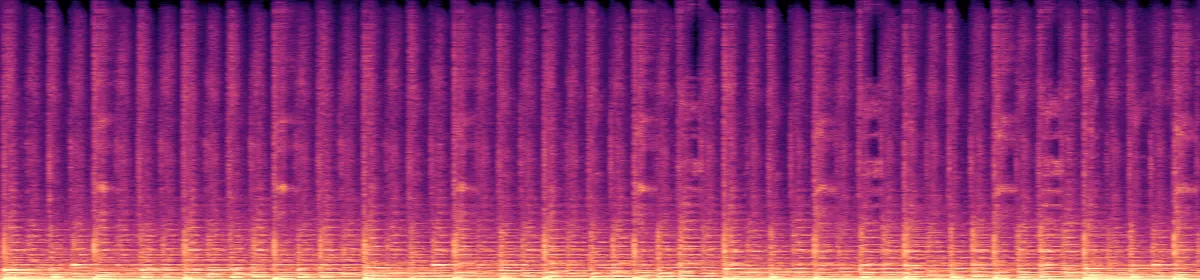 20 kHz10 kHz
The AAC
130 KB
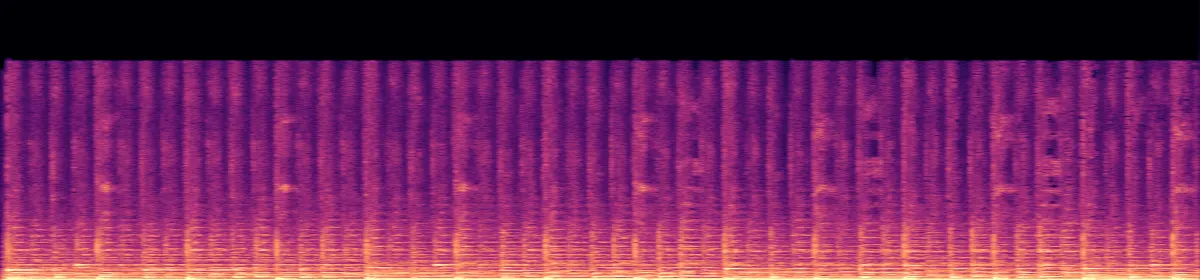 10 kHzStops near 17.3 kHz
The converter's M4A
195 KB
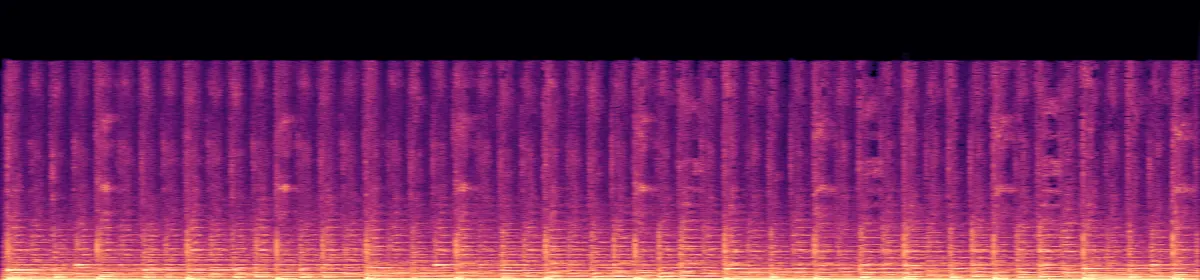 10 kHzStill missing
Convert on your computer
- FFmpeg, copy without re-encoding
Same audio, same size, now with a length and room for tags. Our copy matched the AAC by checksum.
ffmpeg -i in.aac -c:a copy out.m4a- FFmpeg, the converter's command
Encodes the audio again, as this converter does.
ffmpeg -i in.aac -vn -codec:a aac -b:a 192k out.m4a
Related file conversions
Turn an idea into a video
Give Storybook a topic or an article link. It makes an illustrated video with narration and music.
More in Конвертеры
All 42 toolsAAC to M4A questions
All file converters
Search convertersFrom AAC
Any format
Video converters
- 3GP to MOV
- 3GP to MP4
- AVI to FLV
- AVI to MOV
- AVI to MP4
- AVI to MPEG
- AVI to WMV
- FLV to MOV
- FLV to MP4
- FLV to MPEG
- FLV to WMV
- MKV to AVI
- MKV to MOV
- MKV to MP4
- MKV to MPEG
- MKV to WMV
- MOV to AVI
- MOV to FLV
- MOV to MKV
- MOV to MP4
- MOV to MPEG
- MOV to WebM
- MOV to WMV
- MP4 to AVI
- MP4 to FLV
- MP4 to MKV
- MP4 to MOV
- MP4 to MPEG
- MP4 to WebM
- MP4 to WMV
- MPEG to AVI
- MPEG to MOV
- MPEG to MP4
- TS to AVI
- TS to MP4
- WebM to MOV
- WebM to MP4
- WMV to MOV
- WMV to MP4
- WMV to MPEG