M4A to WAV converter
Convert M4A to WAV free: you get 16-bit PCM at the M4A's sample rate, with the title, artist and album kept. From an AAC M4A, the usual kind, every sample is the M4A's own decode, so the WAV holds the same sound; from our 256 kbit/s test M4A at 44.1 kHz it was 5.3 times the size.
- Input
- M4A files
- Saída
- WAV, 16-bit PCM
- Limit
- Up to 200 MB
- Price
- Free, no account
How to convert M4A to WAV
- 01
Choose your M4A file
Drop it on the box or pick it from your device. The limit is 200 MB per file.
- 02
Check what changes
The table under your file shows the size, sound and tags of WAV. Select Convert, and a short security check runs first.
- 03
Download the WAV
Select Download when the conversion finishes. The link expires after one day.
Will the WAV sound better than the M4A?
No. The WAV holds exactly what the M4A plays, uncompressed, so editors can cut and re-save it without another lossy encode.
In an AAC M4A, the encoder removed detail when the file was made, and a WAV can't put it back. We checked a WAV made from our 256 kbit/s test M4A: all 706,560 samples equal the M4A's decode rounded to 16 bits. A 128 kbit/s AAC of the same music stopped near 17.3 kHz, and its WAV stops there too.
An Apple Lossless M4A has nothing removed. From our 16-bit one, every sample reached the WAV unchanged; from a 24-bit one, the WAV kept the top 16 bits of each sample.
Original recording
1.4 MB
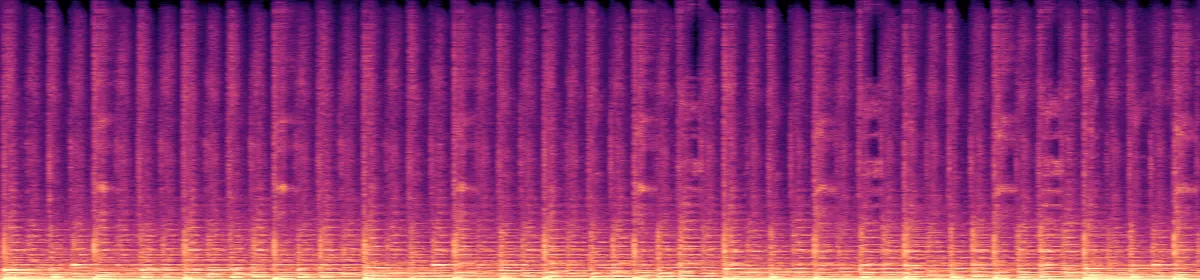 20 kHz10 kHz
Your M4A
266 KB
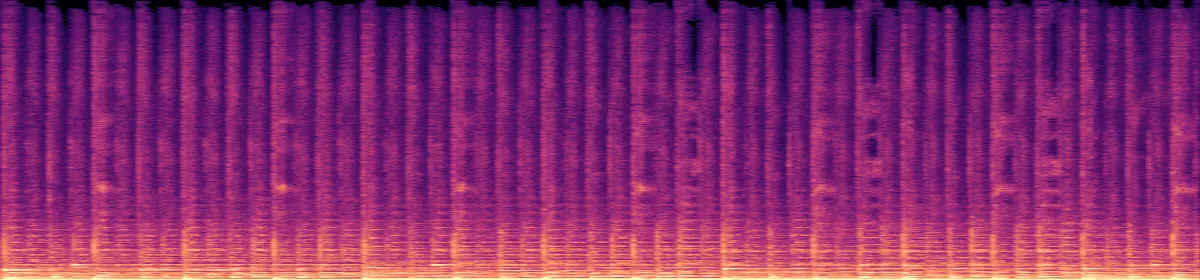 20 kHz10 kHz
The WAV
1.4 MB
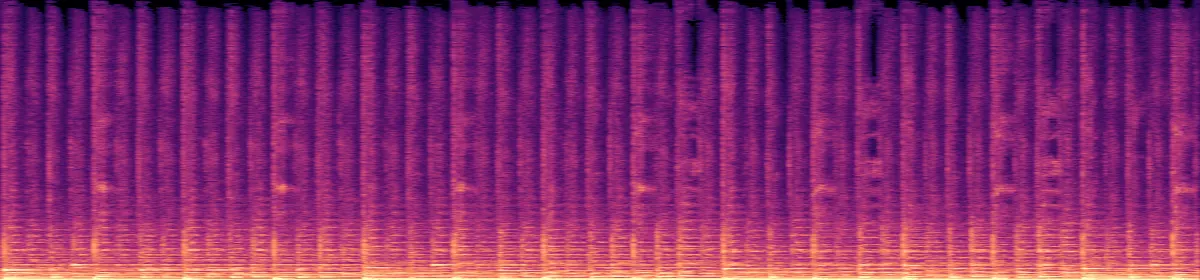 20 kHz10 kHz
How big will the WAV be?
10.6 MB per stereo minute at 44.1 kHz, however small the M4A was.
A 256 kbit/s M4A5.3 times the size
A 128 kbit/s M4A10.8 times the size
A 64 kbit/s mono recording at 48 kHz11.5 times the size
A 16-bit Apple Lossless M4A1.4 times the size
What else changes
- Tags
- Title, artist, album, year, track, genrebecomes All kept
- Cover art
- Embeddedbecomes Dropped
- Bit depth
- AAC: none, it is lossybecomes 16-bit
- Bit depth
- Apple Lossless, 16-bitbecomes 16-bit, every sample the same
- Bit depth
- Apple Lossless, 24-bitbecomes 16-bit, lowest 8 bits cut
- Sample rate and channels
- Your file'sbecomes Unchanged
Convert on your computer
- Audacity, any computer
- File›Export Audio›WAV
Audacity opens M4A only with the free FFmpeg library installed.
- FFmpeg, for a whole folder
This converter's own command, run on every M4A in the folder.
for f in *.m4a; do ffmpeg -nostdin -i "$f" -vn -codec:a pcm_s16le "${f%.m4a}.wav"; done
If the conversion doesn't work
- "This file type isn't supported here"
- The file is probably an .m4p: a song downloaded from Apple Music, or an iTunes Store purchase from before 2009. Those are copy-protected, so this converter can't open them. Files ending in .m4a convert normally.
Related file conversions
Turn an idea into a video
Give Storybook a topic or an article link. It makes an illustrated video with narration and music.
More in Conversores
All 42 toolsM4A to WAV questions
All file converters
Search convertersFrom M4A
Any format
Video converters
- 3GP to MOV
- 3GP to MP4
- AVI to FLV
- AVI to MOV
- AVI to MP4
- AVI to MPEG
- AVI to WMV
- FLV to MOV
- FLV to MP4
- FLV to MPEG
- FLV to WMV
- MKV to AVI
- MKV to MOV
- MKV to MP4
- MKV to MPEG
- MKV to WMV
- MOV to AVI
- MOV to FLV
- MOV to MKV
- MOV to MP4
- MOV to MPEG
- MOV to WebM
- MOV to WMV
- MP4 to AVI
- MP4 to FLV
- MP4 to MKV
- MP4 to MOV
- MP4 to MPEG
- MP4 to WebM
- MP4 to WMV
- MPEG to AVI
- MPEG to MOV
- MPEG to MP4
- TS to AVI
- TS to MP4
- WebM to MOV
- WebM to MP4
- WMV to MOV
- WMV to MP4
- WMV to MPEG