FLAC to OGG converter
Convert FLAC to OGG free: you get Ogg Vorbis at quality 5 with the FLAC's tags. Quality 5 is a variable bitrate, so the size follows the music: 175 kbit/s on our test clip, 17% of the FLAC, and 134 to 142 kbit/s on three film soundtracks.
- Input
- FLAC files
- Saída
- OGG, Vorbis quality 5
- Limit
- Up to 200 MB
- Price
- Free, no account
How to convert FLAC to OGG
- 01
Choose your FLAC file
Drop it on the box or pick it from your device. The limit is 200 MB per file.
- 02
Check what changes
The table under your file shows the size, sound and tags of OGG. Select Convert, and a short security check runs first.
- 03
Download the OGG
Select Download when the conversion finishes. The link expires after one day.
How big will the OGG be?
Quality 5 sets a quality level, not a bitrate. On four recordings it came out between 134 and 175 kbit/s.
Our music test clip took 175 kbit/s. Thirty seconds of each of three Blender films took 137.5 kbit/s for Tears of Steel's dialogue, 142 for the Sintel trailer and 134 for Big Buck Bunny (all three © Blender Foundation, CC BY 3.0). The bars below are our music clip as stereo, mono and 24-bit 96 kHz FLACs.
A 16-bit 44.1 kHz stereo FLAC83% smaller
A mono FLAC82% smaller
A 24-bit 96 kHz FLAC93% smaller
What does the OGG leave out?
On our 16-bit 44.1 kHz test clip, the detail above 20.8 kHz. Subtract the OGG from the FLAC and what is left sits 24.4 dB below the music.
Vorbis is lossy: keep the FLAC as your master copy.
The FLAC
1.0 MB
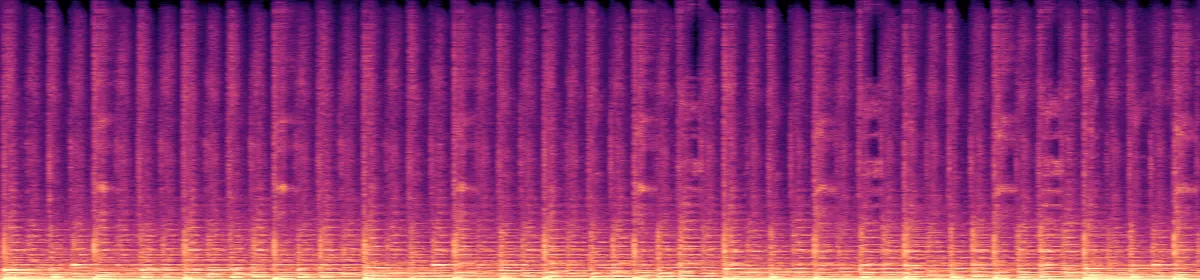 20 kHz10 kHz
The OGG
175 KB
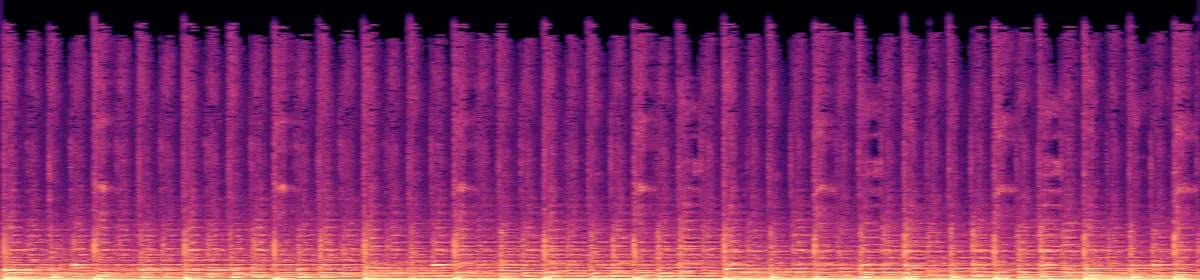 10 kHzRemoved above 20.8 kHz
What else changes
- Tags
- Title, artist, album, year, track, genrebecomes All kept
- Cover art
- Embeddedbecomes Dropped
- Sample rate
- Your file's, 96 kHz includedbecomes Unchanged
- Channels
- Mono, stereo or 5.1becomes Unchanged
Convert on your computer
- FFmpeg, one file
The same command this converter runs.
ffmpeg -i in.flac -vn -codec:a libvorbis -q:a 5 out.ogg- FFmpeg, for a whole folder
The same command, run on every FLAC in the folder.
for f in *.flac; do ffmpeg -nostdin -i "$f" -vn -codec:a libvorbis -q:a 5 "${f%.flac}.ogg"; done
Related file conversions
Turn an idea into a video
Give Storybook a topic or an article link. It makes an illustrated video with narration and music.
More in Conversores
All 42 toolsFLAC to OGG questions
All file converters
Search convertersAny format
Video converters
- 3GP to MOV
- 3GP to MP4
- AVI to FLV
- AVI to MOV
- AVI to MP4
- AVI to MPEG
- AVI to WMV
- FLV to MOV
- FLV to MP4
- FLV to MPEG
- FLV to WMV
- MKV to AVI
- MKV to MOV
- MKV to MP4
- MKV to MPEG
- MKV to WMV
- MOV to AVI
- MOV to FLV
- MOV to MKV
- MOV to MP4
- MOV to MPEG
- MOV to WebM
- MOV to WMV
- MP4 to AVI
- MP4 to FLV
- MP4 to MKV
- MP4 to MOV
- MP4 to MPEG
- MP4 to WebM
- MP4 to WMV
- MPEG to AVI
- MPEG to MOV
- MPEG to MP4
- TS to AVI
- TS to MP4
- WebM to MOV
- WebM to MP4
- WMV to MOV
- WMV to MP4
- WMV to MPEG