MP3 to AIFF converter
Convert MP3 to AIFF free: you get 16-bit PCM at the MP3's sample rate, about 7.3 times the size of a 192 kbit/s MP3 at 44.1 kHz stereo. Every sample equals the MP3's decode rounded to 16 bits, and of the MP3's tags only the title comes along.
- Input
- MP3 files
- Izvade
- AIFF, 16-bit PCM
- Limit
- Up to 200 MB
- Price
- Free, no account
How to convert MP3 to AIFF
- 01
Choose your MP3 file
Drop it on the box or pick it from your device. The limit is 200 MB per file.
- 02
Check what changes
The table under your file shows the size, sound and tags of AIFF. Select Convert, and a short security check runs first.
- 03
Download the AIFF
Select Download when the conversion finishes. The link expires after one day.
Will the AIFF sound better than the MP3?
No. Apple's own Music guide uses this exact case: an AIFF made from an MP3 sounds the same and takes much more space.
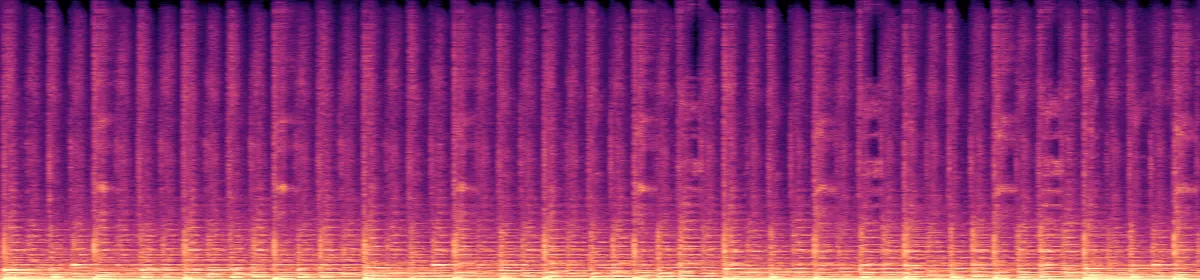
We checked a converted file: all 705,600 samples equal the MP3's decode rounded to 16 bits, and the detail above 18.7 kHz that the MP3 encoder removed is still missing.
Original recording
1.4 MB
 20 kHz10 kHz
Test MP3
194 KB
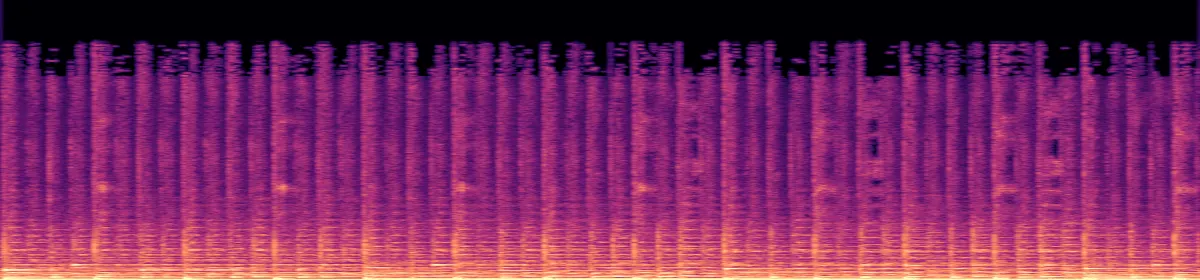 10 kHzRemoved above 18.7 kHz
Its AIFF
1.4 MB
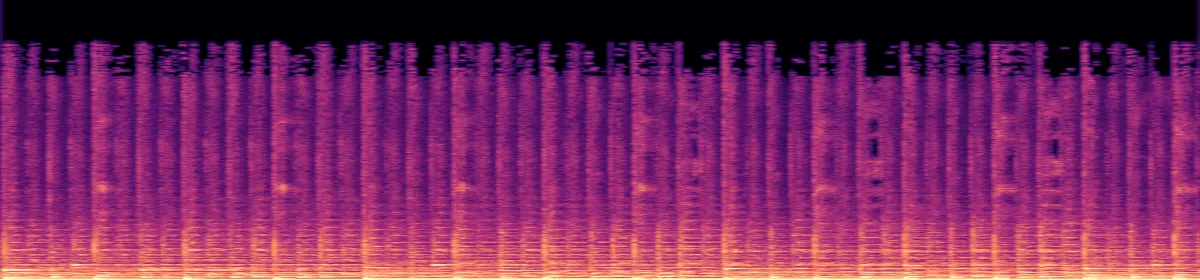 10 kHzStill missing
How big will the AIFF be?
A 192 kbit/s MP3, stereo 44.1 kHz7.3 times the size
A 128 kbit/s MP3, stereo 44.1 kHz10.9 times the size
Which tags survive?
The title. Artist, album, year, track number, genre and cover art are left out.
If you need the tags in an uncompressed file, pick WAV: this converter's WAV keeps all six.
- Title
- In the MP3becomes Kept
- Other tags
- Artist, album, year, track, genrebecomes Dropped
- Cover art
- Embeddedbecomes Dropped
- Sample rate
- Your file'sbecomes Unchanged
Convert on your computer
- FFmpeg, one file, keeping every tag
The converter's command plus -write_id3v2 1, which stores all six tags in the AIFF. We checked: the samples stay the same.
ffmpeg -i in.mp3 -vn -codec:a pcm_s16be -write_id3v2 1 out.aiff- Music on a Mac
- Music›Settings›Files›Import Settings›AIFF Encoder
Then select the song and choose File › Convert › Create AIFF Version. The AIFF appears next to the MP3 in your library.
If the conversion doesn't work
- The AIFF won't play in my browser
- Our test browser, Chromium, did not play this converter's AIFF. Open it in an audio app instead: Windows Media Player lists AIFF among its formats, and Music on a Mac makes AIFF versions itself.
Related file conversions
Turn an idea into a video
Give Storybook a topic or an article link. It makes an illustrated video with narration and music.
More in Konvertori
All 42 toolsMP3 to AIFF questions
All file converters
Search convertersAny format
Video converters
- 3GP to MOV
- 3GP to MP4
- AVI to FLV
- AVI to MOV
- AVI to MP4
- AVI to MPEG
- AVI to WMV
- FLV to MOV
- FLV to MP4
- FLV to MPEG
- FLV to WMV
- MKV to AVI
- MKV to MOV
- MKV to MP4
- MKV to MPEG
- MKV to WMV
- MOV to AVI
- MOV to FLV
- MOV to MKV
- MOV to MP4
- MOV to MPEG
- MOV to WebM
- MOV to WMV
- MP4 to AVI
- MP4 to FLV
- MP4 to MKV
- MP4 to MOV
- MP4 to MPEG
- MP4 to WebM
- MP4 to WMV
- MPEG to AVI
- MPEG to MOV
- MPEG to MP4
- TS to AVI
- TS to MP4
- WebM to MOV
- WebM to MP4
- WMV to MOV
- WMV to MP4
- WMV to MPEG