Audio to video converter
This converter turns an audio file into a video: your sound under a plain black 1280×720 picture, as MP4, MOV, WebM, 3GP, MKV, AVI, MPEG, WMV or FLV. It adds no cover image, waveform or animation, and from our music clip an MP4 took about 1.1 MB a minute.
- Input
- MP3, M4A, WAV, AAC, OGG, FLAC, AIFF, WMA
- Izvade
- 9 video formats
- Limit
- Up to 200 MB
- Price
- Free, no account
How to turn audio into a video
- 01
Choose your audio file
Drop it on the box. The limit is 200 MB.
- 02
Pick the video format
MP4 is picked. The table under the file shows each format's size, picture and sound.
- 03
Download the video
The link lasts one day.
Which video format should I pick?
MP4, unless a program asks for another.
Every format below holds the same black picture. Sizes and cutoffs are from our music clip at 44.1 kHz stereo.
- MP4
H.264 + AAC 128 kbit/s · 1.1 MB a minute · sound to 17.4 kHz
The usual pick: YouTube and TikTok list it, and PowerPoint recommends it.
- MOV
H.264 + AAC 128 kbit/s · 1.1 MB a minute · sound to 17.4 kHz
The MP4's streams in QuickTime's container, for apps that ask for MOV.
- WebM
VP8 + Opus 96 kbit/s · 842 KB a minute · sound to 20.1 kHz
Opus sound at 48 kHz. YouTube, TikTok and PowerPoint list WebM.
- 3GP
H.264 + AAC 96 kbit/s · 822 KB a minute · sound to 15.9 kHz
The smallest on our clip: AAC at 96 kbit/s, which also cut the most treble of the AAC outputs. PowerPoint calls 3GPP deprecated.
- MKV
H.264 + AAC 128 kbit/s · 1.0 MB a minute · sound to 17.4 kHz
The MP4's streams, but MKV is not on YouTube's list.
- AVI
H.264 + AAC 128 kbit/s · 1.1 MB a minute · sound to 17.4 kHz
The MP4's streams in an older container, with the sound 23 ms late. PowerPoint calls AVI deprecated.
- MPEG
MPEG-2 + MP2 384 kbit/s · 5.8 MB a minute · sound to 13.2 kHz
MPEG-2 with MP2 sound. Windows Media Player needs an extension to play MPEG-2.
- WMV
WMV2 + WMA 128 kbit/s · 5.8 MB a minute · sound to 18.7 kHz
Windows Media Player plays it without extras. Fails on sound over 48 kHz or with 5.1.
- FLV
FLV1 + MP3 128 kbit/s · 5.4 MB a minute · sound to 16.2 kHz
YouTube still lists FLV. Fails on 8, 16, 24 and 32 kHz sound.
What's in the video?
A plain black picture under your sound, and nothing else. H.264 stores that black in 44 KB a minute, 4% of the MP4 from our test clip.

- Picture
- Black, 1280×720, 30 frames a second, H.264
- Sound
- AAC, 128 kbit/s from our 44.1 kHz stereo clip
- Length
- The black runs 0.6 s past the sound
- Cover art
- Not used, even if the file has one
- Title, artist
- Dropped
YouTube's help says audio files can't be uploaded as a video, which is why a black picture is enough to get a song or a talk onto it.
Want your cover art instead of black?
Save your image as cover.jpg next to the sound file and run this.
- FFmpeg, with your cover image
From a PNG cover FFmpeg wrote a 4:4:4 MP4 until we added -pix_fmt yuv420p, and YouTube recommends 4:2:0. With -shortest alone the picture ran 2.1 seconds past a 10-second song; the two flags after it end the MP4 with the sound.
ffmpeg -loop 1 -framerate 30 -i cover.jpg -i song.mp3 -vf "scale=1280:720:force_original_aspect_ratio=decrease,pad=1280:720:(ow-iw)/2:(oh-ih)/2" -c:v libx264 -tune stillimage -pix_fmt yuv420p -c:a aac -b:a 192k -shortest -fflags +shortest -max_interleave_delta 100M -movflags +faststart song.mp4
Does the sound change?
Yes. Every format encodes the sound again with its own codec; none keeps your file's bytes.
Our 192 kbit/s test MP3 reached about 18.7 kHz and the MP4's AAC stops near 17.4 kHz. The list above gives each format's cutoff on the same clip.
The MP3
241 KB
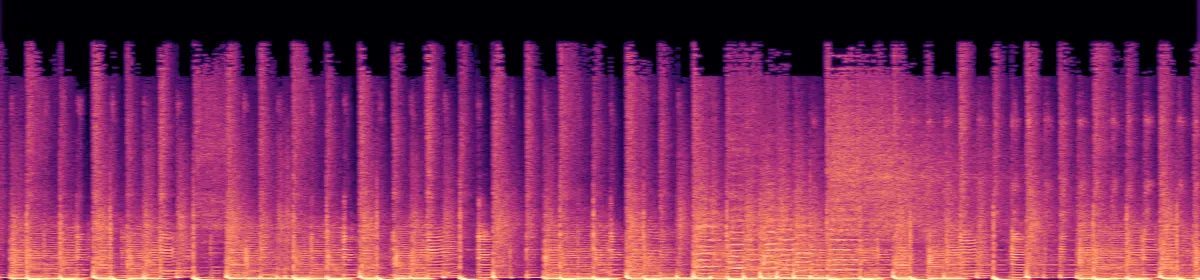 20 kHz10 kHz
The MP4's sound
162 KB
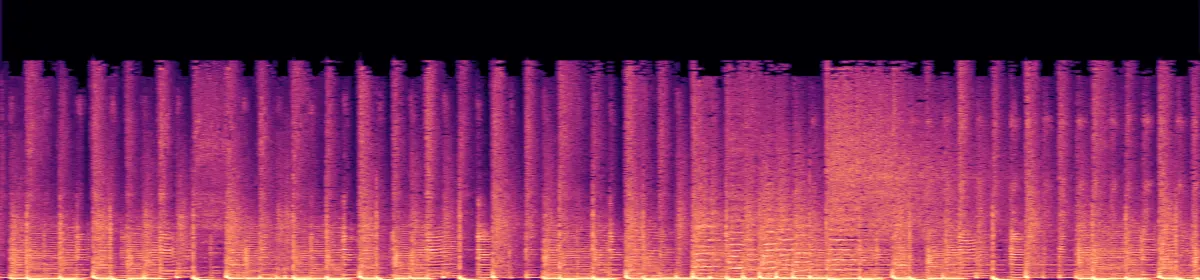 10 kHzStops near 17.4 kHz
How big will the video be?
- MP3, 192 kbit/s5.8 MB
- 3GP3.3 MB
- WebM3.4 MB
- MKV4.2 MB
- MP44.3 MB
- MOV4.3 MB
- AVI4.5 MB
- FLV21.5 MB
- MPEG23.2 MB
- WMV23.3 MB
The pale end of a video's bar is its black picture.
Measured from a 60-second MP3 of our music clip at 44.1 kHz stereo. AAC spends less on quiet or low-rate sound: ten seconds of silence made a 22 KB MP4. MP2, WMA and MP3 spent the same bytes on silence as on music.
If the conversion doesn't work
- "Choose a file under 200 MB."
- That is about 2 h 25 min of sound (MP3, 192 kbit/s), or about 19 minutes (WAV, 44.1 kHz 16-bit stereo). The FFmpeg command has no limit.
- A file over 48 kHz or with 5.1 sound fails as WMV
- FFmpeg's WMA encoder stopped with "sample rate is too high" or "too many channels". MP4 keeps both.
- An 8, 16, 24 or 32 kHz file fails as FLV
- FFmpeg stopped with "FLV does not support sample rate 16000, choose from (44100, 22050, 11025)". 48 kHz got through. MP4 keeps any rate from 8 to 96 kHz.
Related file conversions
Turn an idea into a video
Give Storybook a topic or an article link. It makes an illustrated video with narration and music.
More in Konvertori
All 42 toolsAudio to video questions
All file converters
Search convertersVideo converters
- 3GP to MOV
- 3GP to MP4
- AVI to FLV
- AVI to MOV
- AVI to MP4
- AVI to MPEG
- AVI to WMV
- FLV to MOV
- FLV to MP4
- FLV to MPEG
- FLV to WMV
- MKV to AVI
- MKV to MOV
- MKV to MP4
- MKV to MPEG
- MKV to WMV
- MOV to AVI
- MOV to FLV
- MOV to MKV
- MOV to MP4
- MOV to MPEG
- MOV to WebM
- MOV to WMV
- MP4 to AVI
- MP4 to FLV
- MP4 to MKV
- MP4 to MOV
- MP4 to MPEG
- MP4 to WebM
- MP4 to WMV
- MPEG to AVI
- MPEG to MOV
- MPEG to MP4
- TS to AVI
- TS to MP4
- WebM to MOV
- WebM to MP4
- WMV to MOV
- WMV to MP4
- WMV to MPEG