WAV to MOV converter
This converter puts your WAV under a plain black 1280×720 H.264 picture in a MOV and encodes the sound as AAC, which is lossy. A MOV can also hold the WAV's sound as it is, and the FFmpeg command below does that.
- Input
- WAV files
- 输出
- MOV, black picture
- Limit
- Up to 200 MB
- Price
- Free, no account
How to convert WAV to MOV
- 01
Choose your WAV
Drop it on the box. The limit is 200 MB.
- 02
Check what changes
The table under your file shows the MOV's size, picture and sound.
- 03
Download the MOV
The link lasts one day.
What's in the MOV?
A plain black picture under your sound, and nothing else. H.264 stores that black in 44 KB a minute, 4% of the MOV from our test clip.

- Picture
- Black, 1280×720, 30 frames a second, H.264
- Sound
- AAC, 128 kbit/s from our 44.1 kHz stereo clip
- Length
- The black runs 0.6 s past the sound
- Cover art
- Not used, even if the file has one
- Title, artist
- Dropped
Where can you use the MOV?
- YouTube
- Takes it. YouTube's help says audio files can't be uploaded as a video, and MOV is on its list of upload formats.
- Instagram reels
- Instagram asks for at least 30 frames a second and 720 pixels, between 1.91:1 and 9:16. This video is 30 frames a second, 720 pixels tall and 16:9: inside the limits, at the minimums.
- TikTok
- TikTok's developer docs list MOV and H.264, 23 to 60 frames a second, and at least 360 pixels a side. This video is 30 frames a second at 1280×720.
- PowerPoint
- PowerPoint lists MOV as a supported video format.
- Keynote
- On a Mac, Keynote adds audio files in a format QuickTime supports to a slide or as a soundtrack, without a video.
- Windows Media Player
- Microsoft lists H.264 among the video formats Media Player plays without extras.
Want your cover art instead of black?
Save your image as cover.jpg next to the sound file and run this.
- FFmpeg, with your cover image
From a PNG cover FFmpeg wrote a 4:4:4 MOV until we added -pix_fmt yuv420p, and YouTube recommends 4:2:0. With -shortest alone the picture ran 2.1 seconds past a 10-second song; the two flags after it end the MOV with the sound. -c:a copy puts the WAV's sound in as it is: decoded, it matched our 16-bit WAV sample for sample. That sound keeps its size, 10.6 MB a minute at 44.1 kHz 16-bit stereo, plus the picture.
ffmpeg -loop 1 -framerate 30 -i cover.jpg -i song.wav -vf "scale=1280:720:force_original_aspect_ratio=decrease,pad=1280:720:(ow-iw)/2:(oh-ih)/2" -c:v libx264 -tune stillimage -pix_fmt yuv420p -c:a copy -shortest -fflags +shortest -max_interleave_delta 100M -movflags +faststart song.mov
Does the sound change?
Yes. The converter's MOV holds AAC at about 128 kbit/s, a lossy copy of the WAV.
Our 44.1 kHz WAV had sound up to about 21.7 kHz and the MOV's stops near 17.4 kHz. Subtract one from the other and what is left is 14.5 dB below the music.
The WAV
1.8 MB
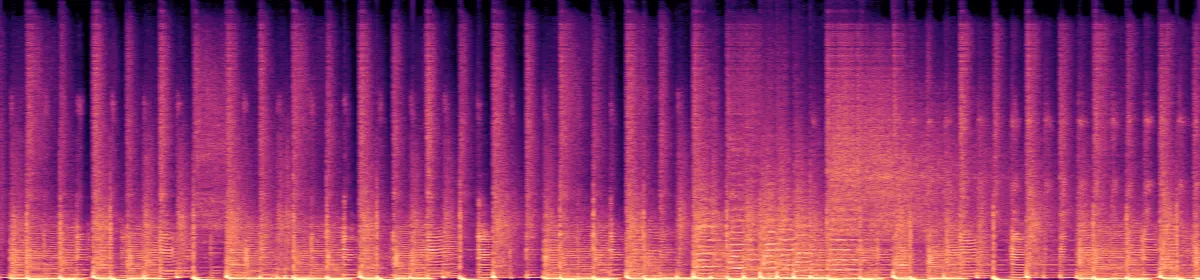 20 kHz10 kHz
The MOV's sound
161 KB
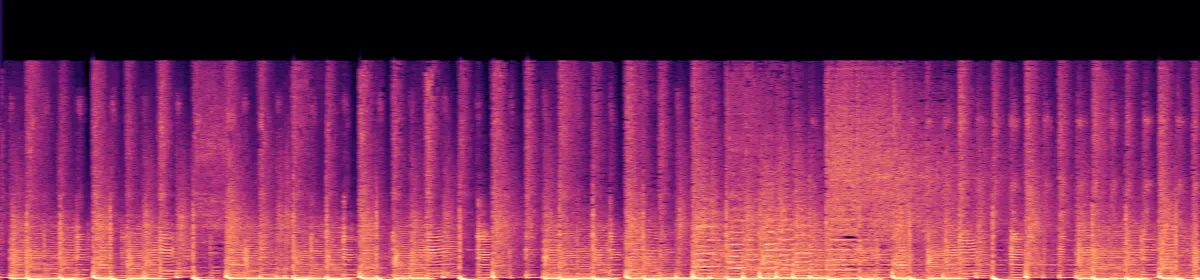 10 kHzStops near 17.4 kHz
A 96 kHz WAV stays 96 kHz and a 5.1 WAV keeps its six channels in the MOV.
The music is 10 seconds of an instrumental we generated with ElevenLabs for these tests, 44.1 kHz stereo.
How big will the MOV be?
- WAV, 44.1 kHz 16-bit stereo42.3 MB
- MOV4.3 MB
The pale end of a video's bar is its black picture.
10 minutes of 44.1 kHz 16-bit stereo WAV is 106 MB; as this MOV, 10.7 MB.
Measured on our music clip at 44.1 kHz stereo; treat other sizes as estimates. AAC spends less where there is less to keep: an 8 kHz mono recording got 42 kbit/s, and ten seconds of silence took 3 KB.
If the conversion doesn't work
- "Choose a file under 200 MB."
- That is about 19 minutes of sound (WAV, 44.1 kHz 16-bit stereo). The FFmpeg command has no limit.
Related file conversions
Turn an idea into a video
Give Storybook a topic or an article link. It makes an illustrated video with narration and music.
More in 转换工具
All 42 toolsWAV to MOV questions
All file converters
Search convertersFrom WAV
Any format
Video converters
- 3GP to MOV
- 3GP to MP4
- AVI to FLV
- AVI to MOV
- AVI to MP4
- AVI to MPEG
- AVI to WMV
- FLV to MOV
- FLV to MP4
- FLV to MPEG
- FLV to WMV
- MKV to AVI
- MKV to MP4
- MKV to MPEG
- MKV to WMV
- MOV to AVI
- MOV to FLV
- MOV to MKV
- MOV to MP4
- MOV to MPEG
- MOV to WebM
- MOV to WMV
- MP4 to AVI
- MP4 to FLV
- MP4 to MKV
- MP4 to MPEG
- MP4 to WebM
- MP4 to WMV
- MPEG to AVI
- MPEG to MOV
- MPEG to MP4
- TS to AVI
- TS to MP4
- WebM to MP4
- WMV to MP4
- WMV to MPEG